
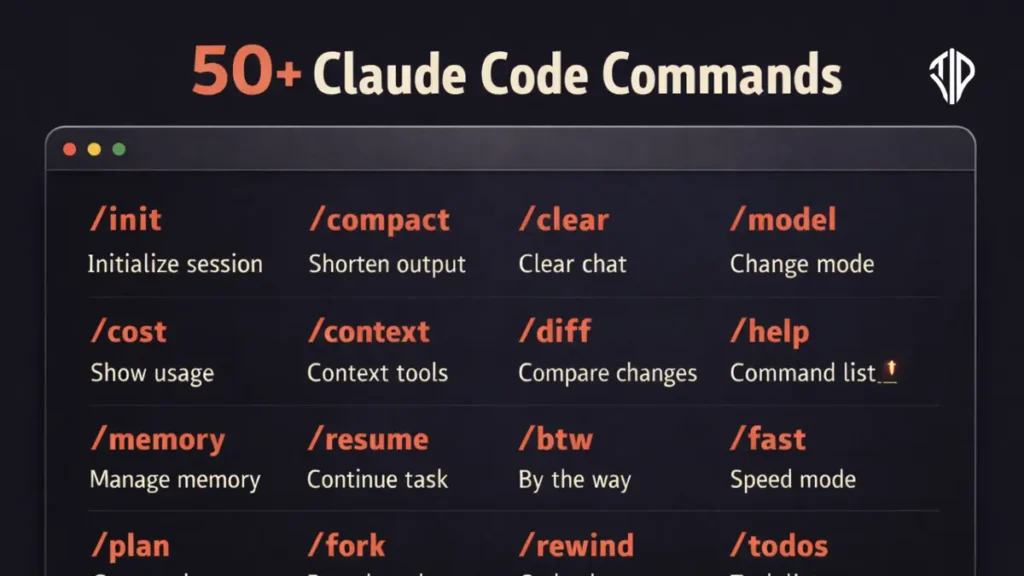
Master the art of using Claude Code CLI commands to streamline your development workflow and maximize AI efficiency. This guide breaks down essential slash commands that transform simple prompts into powerful, multi-step automated actions within your terminal.
In a traditional office setting, a manager might spend hours delegating small tasks to different team members, checking in on progress, and consolidating reports. This back-and-forth creates a bottleneck that slows down the entire project lifecycle, often leading to miscommunication or missed deadlines.
The Claude Code interface functions as an elite operations center for developers, replacing that manual overhead with high-level directives. By using specialized commands, you shift from micromanaging every line of code to issuing broad, intelligent instructions that the AI executes with precision and autonomy.
Top 10 Claude Commands that you need
The Architecture of Efficiency
Claude Commands are the secret to bypassing long, repetitive explanations. In the Claude Code CLI, these commands are typically prefixed with a forward slash (/) and are recognized at the start of a message. They act as bundled skills or built-in functions that trigger complex behaviors.
Instead of asking the AI to “please look at these five files and tell me if there are errors,” a single command like /simplify can trigger a multi-agent review to optimize code quality and efficiency automatically.
Managing Context for Better Results
One of the most common challenges in AI interaction is context bloat, where the conversation becomes too long for the AI to track effectively. Claude provides tools to manage this in a single stroke.
The /compact command allows you to summarize the current conversation, freeing up memory while keeping the most important instructions intact.
If you need a completely fresh slate without losing your history, /clear starts a new session while archiving the previous one, ensuring your prompts remain sharp and relevant.
Orchestrating Large-Scale Changes
For developers handling massive codebases, the /batch command is a game-changer. By providing a single instruction—such as /batch migrate src/ from Solid to React—Claude researches the repository, deconstructs the work into smaller units, and spawns background agents to handle the implementation in parallel. This turns a week-long manual migration into a supervised, automated workflow.
Similarly, the /plan command allows you to enter a strategic mode where the AI drafts a roadmap before writing a single line of code, ensuring the execution aligns with your architectural goals.
Diagnostic and Troubleshooting Tools
Beyond creation, Claude Commands offer robust diagnostic capabilities. If your environment feels sluggish or errors are mounting, the /doctor command performs a full checkup on your installation and settings.
For deep technical issues, /debug enables specialized logging to analyze session friction. These tools ensure that your focus remains on the creative aspects of development rather than the maintenance of the tool itself.
You can also use /rewind to get back to an old conversation and/or code to a previous point, or summarize from a selected message.
Full Claude Commands Reference
To get the absolute best out of Claude in 2026, you need to move beyond simple questions and start using advanced prompt structures, slash commands (for Claude Code), and reasoning frameworks. Here are all powerful “commands” and prompt patterns categorized by how they transform Claude’s output.
Based on the attached HTML document, here are the commands listed in the table:
- /add-dir <path>: Add a working directory for file access during the current session.
- /agents: Manage agent configurations.
- /autofix-pr [prompt]: Spawn a session that watches a PR and pushes fixes when CI fails or reviewers leave comments.
- /batch <instruction>: Orchestrate large-scale changes across a codebase in parallel.
- /branch [name]: Create a branch of the current conversation (alias:
/fork). - /btw <question>: Ask a quick side question without adding to the conversation.
- /chrome: Configure Claude in Chrome settings.
- /claude-api [migrate|managed-agents-onboard]: Load Claude API reference material or upgrade existing API code.
- /clear: Start a new conversation with empty context (aliases:
/reset,/new). - /color [color|default]: Set the prompt bar color for the current session.
- /compact [instructions]: Free up context by summarizing the conversation.
- /config: Open the Settings interface (alias:
/settings). - /context: Visualize current context usage as a grid.
- /copy [N]: Copy the last (or Nth-latest) assistant response to the clipboard.
- /cost: Alias for
/usage. - /debug [description]: Enable debug logging and troubleshoot session issues.
- /desktop: Continue the current session in the Claude Code Desktop app.
- /diff: Open an interactive diff viewer for uncommitted changes.
- /doctor: Diagnose and verify your Claude Code installation and settings.
- /effort [level|auto]: Set the model effort level (e.g., low, medium, high).
- /exit: Exit the CLI (alias:
/quit). - /export [filename]: Export the current conversation as plain text.
- /extra-usage: Configure extra usage to keep working when rate limits are hit.
- /fast [on|off]: Toggle fast mode on or off.
- /feedback [report]: Submit feedback about Claude Code (alias:
/bug). - /fewer-permission-prompts: Scan transcripts and add common tool calls to an allowlist to reduce prompts.
- /focus: Toggle the focus view to show only the last prompt and response.
- /heapdump: Write a JavaScript heap snapshot for diagnosing high memory usage.
- /help: Show help and available commands.
- /hooks: View hook configurations for tool events.
- /ide: Manage IDE integrations and show status.
- /init: Initialize a project with a
CLAUDE.mdguide. - /insights: Generate a report analyzing Claude Code sessions.
- /install-github-app: Set up the Claude GitHub Actions app for a repository.
- /install-slack-app: Install the Claude Slack app.
- /keybindings: Open or create your keybindings configuration file.
- /login: Sign in to your Anthropic account.
- /logout: Sign out from your Anthropic account.
- /loop [interval] [prompt]: Run a prompt repeatedly while the session stays open.
- /mcp: Manage MCP server connections and authentication.
- /memory: Edit
CLAUDE.mdfiles and manage auto-memory settings. - /mobile: Show a QR code to download the Claude mobile app.
- /model [model]: Select or change the AI model.
- /passes: Share a free week of Claude Code with friends.
- /permissions: Manage allow, ask, and deny rules for tool permissions.
- /plan [description]: Enter plan mode directly from the prompt.
- /plugin: Manage Claude Code plugins.
- /powerup: Discover features through interactive lessons and demos.
- /privacy-settings: View and update privacy settings.
- /recap: Generate a one-line summary of the current session on demand.
- /release-notes: View the changelog in an interactive picker.
- /reload-plugins: Reload active plugins without restarting.
- /remote-control: Make the session available for remote control (alias:
/rc). - /remote-env: Configure the default remote environment for web sessions.
- /rename [name]: Rename the current session.
- /resume [session]: Resume a previous conversation (alias:
/continue). - /review [PR]: Review a pull request locally.
- /rewind: Rewind the conversation/code to a previous point (alias:
/undo). - /sandbox: Toggle sandbox mode on supported platforms.
- /schedule [description]: Create, update, or run routines.
- /security-review: Analyze pending changes for security vulnerabilities.
- /setup-bedrock: Configure Amazon Bedrock authentication.
- /setup-vertex: Configure Google Vertex AI authentication.
- /simplify [focus]: Review and fix code reuse, quality, and efficiency issues.
- /skills: List, hide, or sort available skills.
- /stats: Alias for
/usageopening on the Stats tab. - /status: View version, model, account, and connectivity status.
- /statusline: Configure Claude Code’s status line.
- /stickers: Order Claude Code stickers.
- /tasks: List and manage background tasks (alias:
/bashes). - /team-onboarding: Generate a team onboarding guide from usage history.
- /teleport: Pull a Claude Code on the web session into the terminal.
- /terminal-setup: Configure terminal keybindings for Shift+Enter.
- /theme: Change the color theme.
- /tui [default|fullscreen]: Set the terminal UI renderer.
- /ultraplan <prompt>: Draft and execute a plan in an ultraplan session.
- /ultrareview [PR]: Run a multi-agent cloud-based code review.
- /upgrade: Open the upgrade page to switch plans.
- /usage: Show session cost and plan usage limits.
- /voice [hold|tap|off]: Toggle or configure voice dictation modes.
- /web-setup: Connect your GitHub account to Claude Code on the web.
Pro Tip: To get the best results, combine these. For example: L99 /ghost /deepthink "Review this architecture for security flaws." This combination forces a decisive, human-toned, highly reasoned response.
The Power of the Model Context Protocol
To truly push the boundaries of what a single prompt can do, Claude utilizes MCP prompts. These are dynamically discovered from connected servers and allow the AI to reach beyond the terminal into your databases, cloud services, and third-party APIs.
By integrating these servers, your commands become even more potent, enabling you to query live data or trigger deployments with the same ease as editing a local file.
Key Takeaways
- Claude Code CLI uses slash commands to automate complex, multi-step development tasks directly from the terminal.
- Memory and context management are handled through commands like /compact and /clear to maintain AI performance.
- Large-scale architectural changes and migrations can be automated using /batch and /plan for parallel execution.
- In-built diagnostic tools like /doctor and /security-review help maintain environment stability and code safety.
- The Model Context Protocol (MCP) extends Claude’s reach to external databases and third-party cloud services.
Join our community by subscribing to our Weekly Newsletter to stay updated on the latest AI updates and technologies, including the tips and how-to guides. (Also, follow us on Instagram (@inner_detail) for more updates in your feed).
(For more such interesting informational, technology and innovation stuffs, keep reading The Inner Detail).
