

YouTube stands as a global powerhouse, boasting over 2 billion active monthly users and an estimated 122 million daily users, with a staggering 26.1 billion videos hosted as of 2020. This Google-owned platform generated an impressive $19.7 billion in 2020 alone, contributing significantly to Google’s revenue with a valuation of $500 billion.
Beyond its vast collection of entertainment, crafts, fiction, series, and movies, YouTube serves as an unparalleled digital encyclopedia. It hosts an immense library of educational videos from channels like AsapScience and Ted-Ed, alongside captivating science content from Seeker and National Geographic, and numerous coaching resources. This makes YouTube an invaluable treasure trove for contemporary learners, consistently delivering relevant results for any search query.
While YouTube provides an extensive range of content, directly downloading videos to your phone for external use, such as sharing on WhatsApp status or Instagram stories, isn’t a readily available feature, despite an in-app download option.
However, numerous convenient methods exist to download YouTube videos for offline access and sharing. Discover these simple strategies below.
1. Easily Download YouTube Videos with Yout.com

When you’re watching a YouTube video, a straightforward trick involves modifying the URL: simply remove “ube” from “youtube” in the address bar and press Enter. This action redirects you to the Yout.com website, where you can select your desired download format (MP4 video, MP3 audio, or WAV audio) and preferred quality.
Recommended Reading: Discover the Youtuber Who Built a 27,000,000mAh Power Bank for 5000 Smartphones and More!
A key limitation with Yout.com is its restriction on video quality; downloads are capped at 480p unless you subscribe to their Pro membership for $12 monthly. Fortunately, more robust and often free alternatives for high-quality YouTube downloads are available, which we’ll explore next. Consider these options before committing to a paid service.
2. Y2Mate: High-Quality YouTube Video Downloads
Y2Mate offers another incredibly straightforward method for downloading YouTube videos, even supporting high-definition 1080p quality.
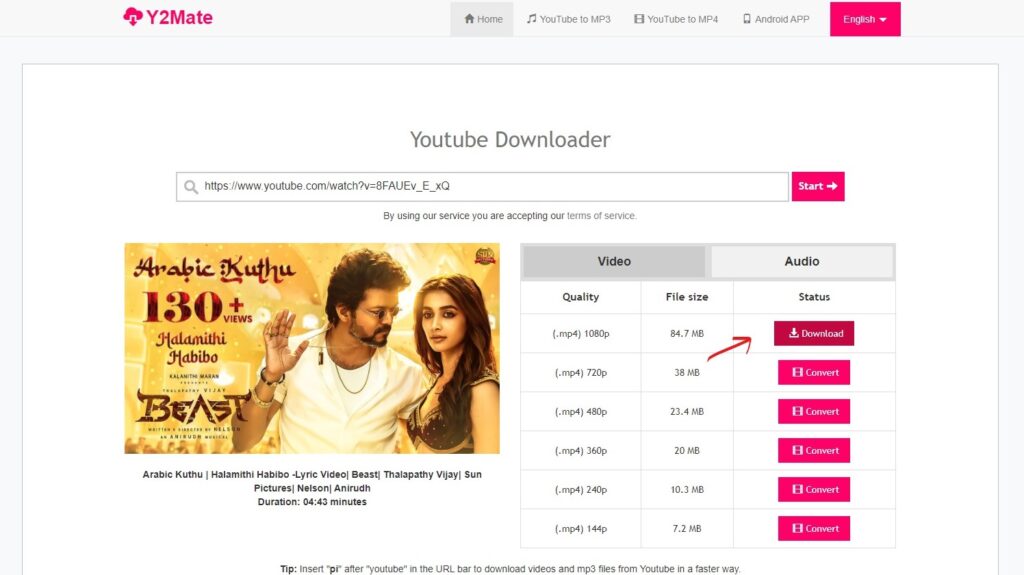
- First, copy the URL of the YouTube video you wish to download.
- Next, navigate to Y2Mate by searching “Y2Mate” on Google, or simply click this direct link: https://y2mate.is/en71/.
- Paste the copied YouTube video URL into the provided input box on the Y2Mate website and click ‘Start’.
- The site will prompt you to select your preferred video quality. Click ‘Convert’ next to your chosen quality; a ‘Download’ button will then appear, which you can click to begin your video download.
- For audio-only downloads, easily switch to the ‘Audio’ tab on the same page and follow a similar process.
3. Videoder Application: Seamless YouTube Downloads
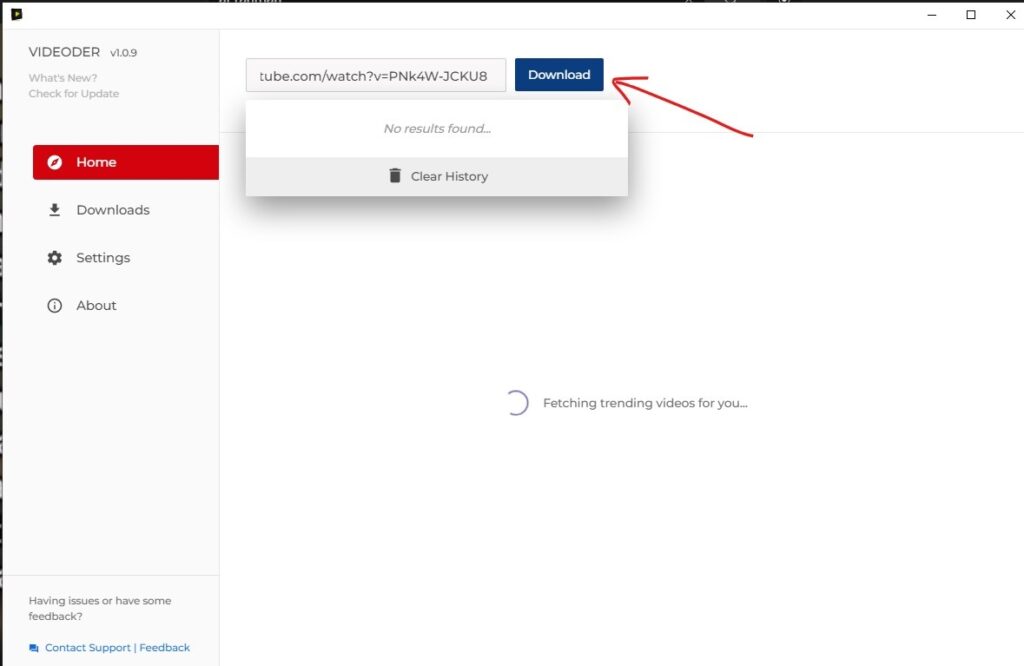
Videoder offers an exceptionally user-friendly experience for downloading YouTube videos, whether on your desktop system or smartphone. The process is straightforward: first, download and install the Videoder application on your device. Then, similar to the previous methods, simply copy the desired YouTube video URL, open the Videoder app, paste the URL, and proceed to download the video in your preferred quality.
Explore More Relevant Content
A standout feature for smartphone users is Videoder’s convenient pop-up notification. Upon copying a YouTube video URL, a download prompt instantly appears, streamlining the process and eliminating the need to manually open the application.
You can download Videoder for your PC/Laptop or for your Android smartphone directly from these links.
Beyond YouTube, Videoder extends its functionality to allow users to download videos from other popular platforms, including Instagram and Twitter.
Got a tech-hack or tech-tip you need assistance with? Feel free to leave a comment below!
Join our community by subscribing to our Weekly Newsletter to stay updated on the latest AI updates and technologies, including the tips and how-to guides. Also, follow us on Instagram (@inner_detail) for more updates in your feed. For more such interesting informational, technology and innovation stuffs, keep reading The Inner Detail.
