
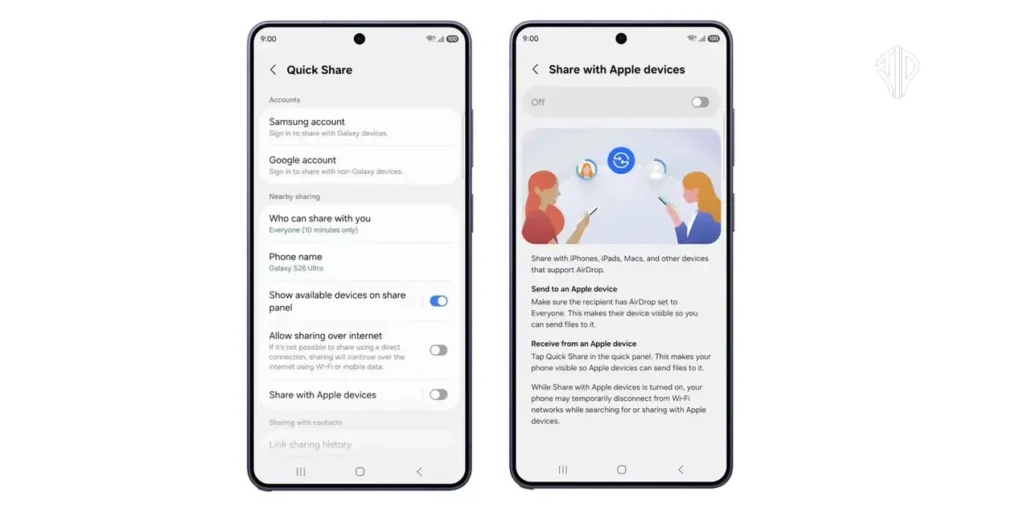
The latest advancements in cross-platform connectivity now allow Samsung and iPhone users to exchange files directly by bringing “Airdrop” to Android. This article breaks down the new integration between Google’s sharing technology and Apple’s ecosystem to simplify your digital life.
In a household where one person uses a flagship Samsung Galaxy and another carries the latest iPhone, the simple act of sharing high-resolution vacation photos often requires a complex series of uploads to cloud storage or third-party messaging apps. This digital wall has long frustrated users who simply want their devices to communicate with the same ease as two devices from the same brand.
Technology should serve as a bridge rather than a barrier, and the latest developments in mobile operating systems suggest a shift toward a more open environment. By understanding the new protocols being established by Google and Apple, you can significantly streamline how you move data across different operating systems without losing file quality or compromising security.
Key Takeaways
- Google and Apple are collaborating to bridge the gap between Quick Share and AirDrop for direct file transfers.
- The new integration allows high-resolution photos and videos to be sent locally via Bluetooth and Wi-Fi without internet usage.
- While launching with the Pixel 10, this capability is scheduled to expand to the broader Samsung Galaxy and Android ecosystem.
- Security is maintained through end-to-end encryption and verified handshake protocols between the two operating systems.
Bridging the Divide Between Quick Share and AirDrop
For years, the mobile landscape was defined by two isolated islands of connectivity: Apple’s AirDrop and Android’s Quick Share. These proprietary systems were designed to work flawlessly within their own ecosystems but remained stubbornly incompatible with one another.
However, a significant breakthrough has arrived as Google begins integrating its sharing tech with Apple’s protocols. While the initial rollout is currently centered on the Pixel 10 series, Google has confirmed that this capability will soon expand to the wider Android landscape, including the popular Samsung Galaxy lineup.
The Step-by-Step Transfer Process
The functionality mimics the intuitive nature of local wireless sharing that users have grown to love. To initiate a transfer from an Android device to an Apple device, you first open the Quick Share menu on the Android phone and select the specific photos, videos, or documents you wish to send. The device then performs a local scan using Bluetooth and Wi-Fi to identify nearby hardware.
Once the recipient’s iPhone or Mac appears in the list of available devices, you simply select it. On the receiving Apple device, a standard AirDrop prompt will appear, asking the user to accept the incoming transfer. Upon clicking accept, the file is transmitted directly between the devices, bypassing the need for an internet connection or cellular data.
Comparing Sharing Technologies
The following table highlights the core differences and the new points of convergence between these two industry-standard sharing methods.
| Feature | Apple AirDrop | Google Quick Share | Cross-Platform Mode |
|---|---|---|---|
| Primary Connection | Bluetooth & Wi-Fi | Bluetooth & Wi-Fi | Integrated Bridge |
| Initial Release | 2011 | 2020 (as Nearby Share) | 2024 (Limited Rollout) |
| Data Encryption | End-to-End | End-to-End | Verified Secure |
| File Quality | Full Resolution | Full Resolution | Full Resolution |
Strengthening Digital Security and Privacy
A primary concern with cross-platform sharing is the maintenance of strict security standards. Google has implemented robust safeguards to ensure that files remain protected during the transition between the two different operating systems.
These security protocols have undergone rigorous testing by outside experts to ensure that the handshake between Quick Share and AirDrop does not create vulnerabilities. This development follows a history of recent collaborations, such as the joint effort to alert users of unauthorized Bluetooth trackers and the integration of RCS (Rich Communications Services) on iPhones.
While the reference for this new technology currently highlights the Pixel 10, the strategic move by Google to expand this to other Android devices is a win for Samsung users. In the interim, Samsung owners can use the Share via Link or QR Code features within the Quick Share menu to send large files to iPhone users without compression. As the full integration rolls out, the friction between the two dominant mobile platforms will continue to dissipate, favoring user convenience over brand exclusivity.
Join our community by subscribing to our Weekly Newsletter to stay updated on the latest AI updates and technologies, including the tips and how-to guides. (Also, follow us on Instagram (@inner_detail) for more updates in your feed).
(For more such interesting informational, technology and innovation stuffs, keep reading The Inner Detail).
