
Imagine an AI that doesn’t just understand your commands, but can actually see and interact with a web page or mobile app just as you would. This isn’t a futuristic fantasy anymore. Google has officially launched its Gemini 2.5 Computer Use model, a groundbreaking advancement in artificial intelligence that enables agents to interact with user interfaces (UIs) by visually understanding them. This innovation marks a significant leap towards truly intelligent agents capable of navigating our digital world autonomously.
At its core, the Gemini 2.5 Computer Use model is a specialized version built upon the robust visual understanding and reasoning capabilities of Gemini 2.5 Pro. Its primary function is to empower AI agents to perform complex tasks by interacting directly with software UIs. Think of it as giving an AI the ability to click buttons, type into forms, scroll through content, and manipulate interactive elements like dropdowns – essentially, everything a human does when using a computer, but at unprecedented speed and scale.
How Does This Digital Conjurer Work Its Magic?
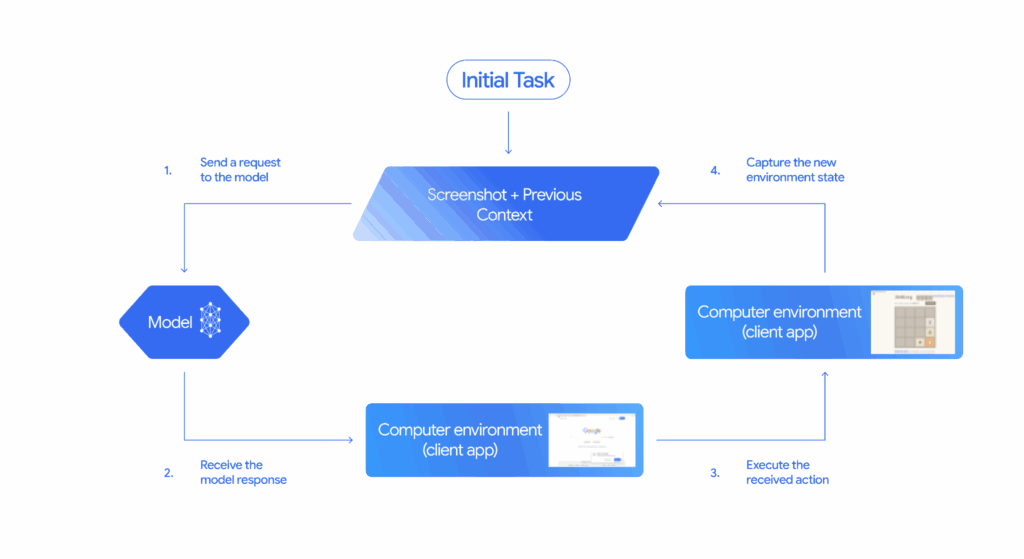
The brilliance of the Gemini 2.5 Computer Use model lies in its iterative process, which is exposed through a new computer_use tool within the Gemini API. Here’s a simplified breakdown of the loop:
- The Request: The process begins with a user’s instruction or request for a task.
- The View: The model receives a screenshot of the current user interface, along with a history of recent actions taken. This visual input is crucial for its understanding.
- The Analysis: Gemini 2.5 Computer Use analyzes these inputs, understanding the visual layout and the context of the user’s request.
- The Action: Based on its analysis, the model generates a response, typically a function call representing a UI action (e.g., clicking a specific button, typing text into a field). For sensitive actions like making a purchase, it may also request user confirmation.
- The Execution & Loop: Client-side code then executes the proposed action. Once the action is complete, a new screenshot of the GUI and the current URL are sent back to the Computer Use model, restarting the loop. This cycle continues until the task is successfully completed, an error occurs, or the interaction is terminated.
While primarily optimized for web browsers, demonstrating remarkable proficiency in web control benchmarks, the model also shows significant promise for mobile UI control tasks. It’s a testament to its versatility and the underlying power of Gemini 2.5 Pro’s visual reasoning.
Beyond Traditional AI Browsers: A Unique Paradigm Shift
Many contemporary AI-enhanced browsers integrate features designed to assist the user. These might include tools for summarizing articles, generating content, improving search results, or even answering questions directly within the browser interface. While incredibly helpful, these functionalities largely augment the user’s experience or provide information, rather than taking direct, autonomous control of the UI to execute tasks.
The Gemini 2.5 Computer Use model, however, represents a fundamentally different approach. It doesn’t just help you use the browser; it becomes an agent that can operate the browser (or any UI) on your behalf. This is a crucial distinction. Instead of merely offering AI-powered summarization or content creation for a page you’re viewing, this model can log into accounts, fill out complex multi-page forms, navigate through intricate websites, and manage applications based on a high-level goal, all by “seeing” and “interacting” with the interface itself.
This capability is truly unique because it transcends the limitations of traditional APIs. While many AI models can interact with software through structured APIs, a vast number of digital tasks still necessitate direct interaction with graphical user interfaces. Gemini 2.5 Computer Use bridges this gap, enabling AI to tackle the “unstructured” visual world of UIs, a challenge that few, if any, existing AI browser features comprehensively address in the same way. It’s about giving AI agency over the interface, not just intelligence within it.
Navigating the Future Responsibly: Safety First
Introducing AI agents that can control computers naturally raises important safety concerns. Google acknowledges these unique risks, which include intentional misuse by users, unexpected model behavior, and vulnerabilities to prompt injections or web-based scams. To address these challenges, Google has implemented robust safety guardrails:
- In-Model Safety Features: The model has been trained with safety features directly integrated to mitigate the three key risks identified.
- Developer Controls: Developers are provided with controls to prevent the model from automatically executing potentially high-risk or harmful actions. These include preventing actions that could compromise system integrity, bypass security measures, or control sensitive devices.
- Per-step Safety Service: An out-of-model service assesses each action the model proposes before it’s executed, adding an extra layer of protection.
- System Instructions: Developers can further instruct agents to refuse or seek user confirmation for specific high-stakes actions.
Google stresses the importance of thorough testing by developers before deploying any systems built with this model, emphasizing a shared responsibility in building beneficial and secure AI.
Real-World Impact and Early Successes
Even in its preview phase, the Gemini 2.5 Computer Use model is already making waves. Google teams have deployed it for crucial internal use cases, such as UI testing, significantly accelerating software development cycles. Versions of this model also power capabilities within Project Mariner, the Firebase Testing Agent, and even certain agentic features in AI Mode in Search.
Early access program users have been leveraging the model for personal assistants, workflow automation, and further UI testing, reporting strong positive results. The potential for streamlining repetitive digital tasks and unlocking new levels of automation is immense.
Getting Started: Your Gateway to Automated Futures
For developers eager to explore this transformative technology, the Gemini 2.5 Computer Use model is now available in public preview via the Gemini API on Google AI Studio and Vertex AI. Google provides comprehensive reference materials and documentation to guide developers in building their own agent loops, whether locally with Playwright or in a cloud VM with Browserbase. An engaging demo environment hosted by Browserbase is also available for immediate exploration. The Google Developer Forum offers a vibrant community space to share feedback and help shape the future roadmap of this exciting innovation.
This move by Google is not just another update; it’s a profound step towards a future where AI agents can seamlessly interact with our digital tools, freeing us from mundane tasks and unlocking new frontiers of productivity and creativity. The ability for AI to “see” and “do” on the web opens up a universe of possibilities that we are only just beginning to imagine.
Key Takeaways
- Gemini 2.5 Computer Use model allows AI to interact with UIs, mimicking human actions.
- It uses visual understanding to perform tasks like clicking buttons and filling forms.
- Google has implemented safety measures to prevent misuse and ensure responsible use.
- The model is already being used for UI testing and powering AI features in Google products.
Join our community by subscribing to our Weekly Newsletter to stay updated on the latest AI updates and technologies, including the tips and how-to guides. (Also, follow us on Instagram (@inner_detail) for more updates in your feed).
(For more such interesting informational, technology and innovation stuffs, keep reading The Inner Detail).