
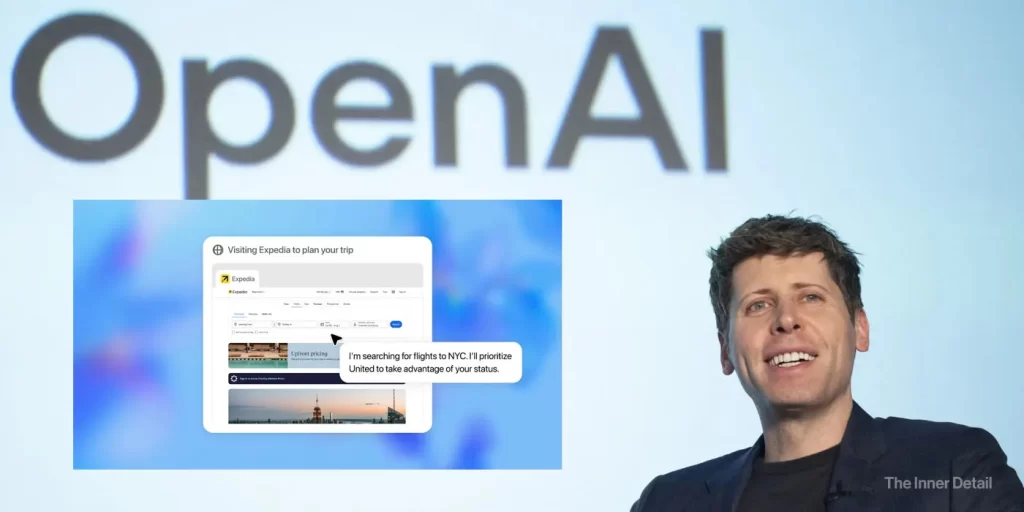
The world of Artificial Intelligence is constantly evolving, and OpenAI is once again at the forefront with its latest innovation: ChatGPT Agent. This powerful new tool aims to revolutionize how we interact with online tasks, promising to take on complex workflows from start to finish. But what exactly is it, what can it do, and how can you leverage its capabilities? Let’s dive in.
OpenAI’s AI Agent
OpenAI’s new offering, creatively dubbed ChatGPT Agent, is an advanced AI agent that represents a significant leap forward in automated assistance. At its core, it’s designed to do work for you using its own virtual computer, handling complex tasks from start to finish based on your instructions.
This isn’t an entirely new concept for OpenAI; the ChatGPT Agent is a natural evolution that unifies the strengths of its earlier breakthroughs: Operator and Deep Research. Previously, Operator excelled at interacting with websites (like scrolling, clicking, and typing), while Deep Research was adept at analyzing and summarizing vast amounts of information. However, they operated best in different scenarios and couldn’t combine their powers effectively. Now, by integrating these complementary strengths into ChatGPT and adding new tools, OpenAI has unlocked entirely new capabilities within a single model. This means ChatGPT Agent can fluidly shift between reasoning and action, adapting its approach for speed, accuracy, and efficiency.
What OpenAI’s Agent Can Do?
The unified agentic system of ChatGPT Agent enables it to perform a wide array of tasks, significantly enhancing its utility in both professional and personal contexts.
a) Online Tasks
ChatGPT Agent is equipped with a suite of tools, including a visual browser for graphical web interaction, a text-based browser for simpler queries, a terminal, and direct API access. This diverse toolkit allows it to choose the optimal path for efficient task execution. It can intelligently navigate websites, filter results, prompt you to log in securely when needed, run code, and conduct analysis.
Think of it as a personal assistant that can handle requests like:
- Looking at your calendar to brief you on upcoming client meetings based on recent news.
- Planning and buying ingredients to make a specific meal, like Japanese breakfast for four.
- Actively engaging websites—clicking, filtering, and gathering precise results.
- Automating repetitive tasks, such as converting screenshots or dashboards into editable presentations, rearranging meetings, planning and booking offsites, or updating spreadsheets with new financial data.
- Effortlessly planning and booking travel itineraries, designing and booking entire dinner parties, or finding specialists and scheduling appointments in your personal life.
- Even automating small parts of your routine, like requesting new office parking weekly.
The agent can also leverage ChatGPT connectors, allowing it to integrate with apps like Gmail and GitHub to find information relevant to your prompts and use them in its responses. When sensitive information or login is required, it can put you in a “takeover mode,” where you securely log in, allowing the agent to go deeper and broader in its research and task execution without collecting or storing your sensitive data like passwords.
b) Making PPTs and Spreadsheets
Beyond web browsing and data gathering, the ChatGPT Agent excels at generating and manipulating structured data and documents:
- It can deliver editable slideshows and spreadsheets that summarize its findings.
- It can help create presentations composed of editable vector elements.
- It’s capable of updating spreadsheets with new financial data while retaining the original formatting.
The capabilities are backed by impressive performance. On SpreadsheetBench, which evaluates models on their ability to edit real-world spreadsheets, ChatGPT Agent significantly outperforms existing models with 45.5% accuracy, compared to Copilot in Excel’s 20.0% (humans score 71.3%). It also significantly outperforms previous models on investment banking analyst modeling tasks, like putting together a three-statement financial model or building a leveraged buyout model, which are graded on hundreds of correctness and formula use criteria.
However, it’s important to note that the slideshow functionality is currently in beta. While it’s great at organizing information in a suitable flow and format with editable elements (text, charts, images, shapes), the outputs can sometimes feel rudimentary in their formatting and polish, especially when starting without an existing document. There can also be occasional discrepancies between the viewer and exported PowerPoint files, which OpenAI is actively working to reduce. Additionally, while you can upload existing spreadsheets for editing, this feature isn’t yet available for slideshows.
How to Use the AI Agent?
Getting started with ChatGPT Agent is straightforward, giving you full control over the process.
Activation: For Pro, Plus, and Team users, you can activate ChatGPT’s new agentic capabilities directly through the tools dropdown from the composer. Simply select ‘agent mode’ at any point in any conversation, or you can also type /agent.
Describe Your Task: Once activated, just describe your desired task—whether it’s conducting deep research, creating a slideshow, or submitting expenses.
Active Control and Collaboration: You are always in control. ChatGPT is designed for iterative, collaborative workflows, meaning you can interrupt it at any point to clarify instructions, steer it toward desired outcomes, or even change the task entirely. It will pick up where it left off, incorporating your new information without losing previous progress. Conversely, the agent may also proactively seek additional details from you to ensure the task aligns with your goals.
If you’re looking to create AI Agents for yourself or for your business, check out our Guide-book on “How to build AI Agents for Free?“
Visibility and Oversight: As ChatGPT works, an on-screen narration provides visibility into exactly what it’s doing. For actions of consequence, like making a purchase or sending emails, ChatGPT is trained to explicitly ask for your permission before proceeding. Certain critical tasks, such as sending emails, even require your active oversight via “Watch Mode,” where you must not navigate away from the tab or the tool will stop.
Scheduling and Connectors: You can also schedule completed tasks to recur automatically, such as generating a weekly metrics report every Monday morning. The agent can access your connectors to integrate with your workflows and access relevant, actionable information from linked apps like Gmail or GitHub.
Availability
ChatGPT Agent is rolling out in phases:
- The AI Agent started rolling out today to Pro, Plus, and Team users. Pro users were expected to get access by the end of the launch day, while Plus and Team users would gain access over the next few days.
- Enterprise and Education users are slated to get access in the coming weeks or later this summer.
- Currently, there is no specific timeline provided for free users.
- Regarding usage, Pro users have a cap of 400 messages per month, while other paid users are limited to 40 messages monthly, with additional usage available via flexible credit-based options.
- OpenAI is still working on enabling access for the European Economic Area and Switzerland.
- For those familiar with previous tools, the Operator research preview site will be sunset, but Deep Research remains a part of ChatGPT Agent’s capabilities. You can still access the original Deep Research feature for more detailed, in-depth responses by selecting “deep research” from the dropdown in the message composer if you prefer it.
Pros and Cons
As with any powerful new technology, ChatGPT Agent comes with its own set of advantages and limitations.
| Category | Pros | Cons |
|---|---|---|
| Automation & Capabilities | – Unparalleled automation for complex, multi-step tasks, saving significant human effort. – Unified and comprehensive capabilities by combining web interaction (Operator) and deep analysis (Deep Research). | – Requires human intervention for crucial tasks, as it asks for permission before taking actions of consequence (e.g., purchases), limiting full automation in high-stakes scenarios. |
| User Control & Performance | – Strong user control and collaboration: users are always in control, can interrupt, steer, or pause tasks without losing progress. – Strong performance benchmarks, outperforming previous models on challenging real-world tasks and evaluations (e.g., Humanity’s Last Exam, FrontierMath). | – Potential for sluggishness and mistakes: can be slow (e.g., ordering cupcakes took “almost an hour”) and is prone to making errors (e.g., inaccurate trip planning). |
| Safety & Privacy | – Robust safety and privacy measures: “strongest safety stack yet” with explicit user confirmation for real-world consequences, “Watch Mode” for critical tasks, proactive refusal of high-risk actions, privacy controls (delete browsing data), and enhanced mitigations against prompt injection. | – Increased risk profile due to expanded tools and broader user reach, working directly with user data accessed through connectors or logged-in websites. |
| Development Stage & Availability | – Still in early stages and can make mistakes; slideshow functionality is in beta and rudimentary. – Availability and cost constraints: not available to free users, paid users have message caps, and geographical availability is limited. |
Think of ChatGPT Agent as a highly skilled apprentice. It can perform many complex tasks and even suggest solutions, often more efficiently than you could. However, like any apprentice, it still needs your oversight and final approval for critical decisions, ensuring that while it automates the heavy lifting, you remain the master of your digital domain.
Key Takeaways
- ChatGPT Agent unifies Operator and Deep Research capabilities into a single AI model.
- It can handle a wide array of online tasks, from web browsing to generating presentations.
- User control and collaboration are central to its design, with built-in safety and privacy measures.
Join our community by subscribing to our Weekly Newsletter to stay updated on the latest AI updates and technologies, including the tips and how-to guides. (Also, follow us on Instagram (@inner_detail) for more updates in your feed).
(For more such interesting informational, technology and innovation stuffs, keep reading The Inner Detail).






Pingback: Microsoft Edge is an "AI-Agent" Now: Can Do These Tasks For You - The Inner Detail