
In a move that tech analysts are comparing to the launch of the Apple App Store, OpenAI has unveiled a full-fledged app ecosystem running directly inside ChatGPT.
This new platform allows developers to build, submit, and monetize applications, turning the chatbot into a comprehensive operating system for your digital life.
Here is everything you need to know about this massive shift, how it works, and why it changes the landscape of Artificial Intelligence.
What Is ChatGPT “Apps”?
Until now, ChatGPT was largely a text generator. You asked a question, and it gave an answer. With the launch of Apps in ChatGPT, the AI transitions from a passive informational tool to an active “agent” capable of executing tasks.
This is not just a plugin system; these are full interactive applications embedded within the chat interface. Users can invoke these apps simply by typing “@” followed by the app name (e.g., “@Spotify”) or selecting them from a Tools menu.
Alternatively, apps can be selected from the “tools menu” (often indicated by a plus sign) or discovered through the new App Directory located at chatgpt.com/apps.
Once an app is invoked for the first time, ChatGPT will prompt you to log in and authorize the connection to your external account. Currently, this functionality is available to Free, Plus, and Pro users, though it has not yet rolled out to Enterprise or Education plans.
OpenAI has released an Apps SDK (Software Development Kit) and opened an app directory, effectively creating a “Play Store” where verified developers can submit their own applications for review and publication.
Why Is This Useful?
The primary value of this update is efficiency and context retention. It eliminates the need to “tab switch” between different websites to get things done.
Imagine you are planning a date night. In the past, you would open Google for ideas, Spotify for music, and a reservation site for dinner. Now, you can do it all in one thread:
- Seamless Workflow: You can ask ChatGPT to “Make a relaxing work playlist,” and it will interface with Spotify to build it and present a playable widget without you leaving the chat.
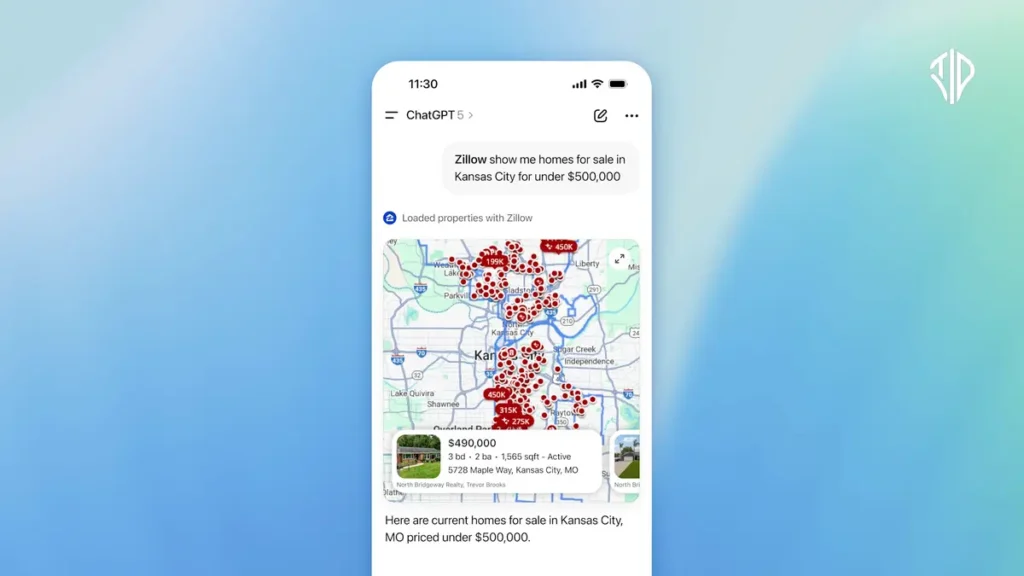
- Visual Interaction: If you are house hunting, Zillow doesn’t just list addresses; it generates an interactive map with price sliders and photo galleries right inside the chat window.
- Complex Task Execution: You can upload a transcript and ask Canva to “turn this into 5 slides,” and it will generate the actual visual assets for you to edit.
How It Stands Unique Among Other AI Models
While other AI models like Claude or Gemini have strong reasoning capabilities, ChatGPT’s App platform sets it apart in three distinct ways:
- The “iPhone Moment” for AI
Just as the iPhone became revolutionary only after third-party developers were allowed to build for it, ChatGPT is pivoting to a platform model. It is no longer just relying on OpenAI’s engineers; it is crowdsourcing innovation from developers globally. - “Agentic” Action vs. Passive Text
Most LLMs are passive—they wait for a prompt and reply with text. ChatGPT Apps utilize Agentic AI, meaning the AI understands how to use external tools to perform actions in the real world, such as booking a hotel or ordering a physical product, rather than just talking about it. - Interactive UI Elements
Unlike standard chatbots that respond with code blocks or markdown text, ChatGPT Apps support Chat-Native Interfaces. This means the AI can render buttons, maps, graphs, and checkout flows, making the experience feel like using a modern software application rather than a command-line terminal.
The List: Apps Already Available in ChatGPT
OpenAI has partnered with major industry players to populate the directory at launch. Here are some of the standout apps you can use right now:
- Spotify & Apple Music: Create and play playlists based on your mood or activity directly within the chat.
- Canva: Generate social media graphics, presentations, and slides from simple text prompts or uploaded files.
- Zillow: Search for real estate with specific criteria (e.g., “3-bedroom under $500k”) and view interactive maps and listings.
- DoorDash & Uber Eats: (Coming Soon/Rolling Out) Order food or discover local restaurants based on your cravings.
- Expedia, Booking.com, & Tripadvisor: Plan entire trips, including flights and hotels, by chatting about your budget and dates.
- Figma: Convert rough sketches or napkin drawings into professional digital diagrams.
- Coursera: Find video lessons and educational content which can be played directly in the interface.
- Target: Receive product recommendations and proceed to purchase physical goods.
- Instacart: Turn recipe suggestions into a grocery delivery order instantly.
How Developers Can Join the “App Store”
For creators and developers, this is a new frontier for monetization and reach. OpenAI has opened submissions with specific guidelines to ensure safety and quality:
- Submission Process: Developers must use the OpenAI Platform Dashboard to submit apps, which undergo a review process similar to Apple or Google’s stores.
- Monetization: Currently, apps can facilitate the sale of physical goods (like clothes or food). Support for digital goods and subscriptions is planned for the future.
- Safety First: OpenAI strictly prohibits apps related to high-risk categories like gambling, adult content, or surveillance.
This update transforms ChatGPT from a helpful chatbot into the central hub of your digital life—a single interface to control the internet.
Join our community by subscribing to our Weekly Newsletter to stay updated on the latest AI updates and technologies, including the tips and how-to guides.
(Also, follow us on Instagram (@tid_technology) for more updates in your feed and our WhatsApp Channel to get daily news straight to your Messaging App).