
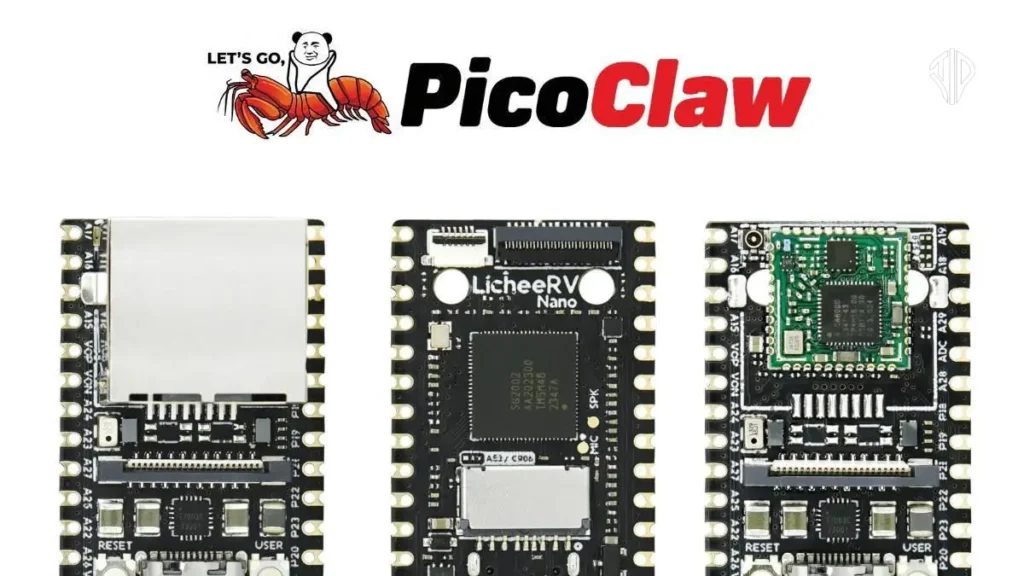
The world of AI agents is evolving at a breakneck pace, and a new player has just shifted the entire landscape. Just as users were becoming accustomed to the power of OpenClaw, a new, ultra-lightweight version called PicoClaw has emerged from Shenzhen, China.
Developed by a company called Sipeed, PicoClaw represents a massive leap in efficiency, proving that you don’t need a high-end computer to run a sophisticated AI assistant.
What is PicoClaw?
PicoClaw is an ultra-lightweight personal AI assistant inspired by the open-source frameworks OpenClaw and Nanobot. Its primary mission is to deliver core agent functionality without the heavy computational “baggage” of its predecessors.
While OpenClaw is built on TypeScript and Node.js with roughly 430,000 lines of code, PicoClaw is written in Golang and achieves similar core results with just 4,000 lines of code.
It operates as an orchestration loop—a “tiny traffic controller” that receives your messages (via Telegram or Discord), sends them to powerful cloud LLMs like Anthropic or OpenAI, and executes tools based on the response.
It is designed to be a “scalpel” to OpenClaw’s “factory,” focusing on speed and core task execution rather than heavy browser automation or complex multi-agent setups.
The Technical “Magic” Behind the Speed
The most shocking aspect of PicoClaw is its minimal footprint. It transforms the accessibility of AI agents through several key technical breakthroughs:
- Minimal RAM Requirements: While most agents require over 1 GB of RAM, PicoClaw runs on less than 10 megabytes.
- Lightning-Fast Boot Times: PicoClaw starts up in less than a second, making it roughly 400 times faster to initialize than OpenClaw, which can take up to 500 seconds depending on the setup.
- Hardware Agility: Because it is so lightweight, it can run on a $10 Linux board, an old Raspberry Pi, or even a spare Android phone using Termox.
How PicoClaw Transforms Accessibility
Before PicoClaw, the common sentiment in the AI community was that running a persistent, always-on agent required a $600 Mac Mini or a dedicated server. PicoClaw has demolished this barrier to entry.
By shrinking the “orchestrator footprint,” it allows anyone to build an autonomous agent for the price of a coffee. This shift means AI agents can now be embedded in everyday objects—from routers and cars to “old computers collecting dust”—without needing expensive hardware upgrades.
It makes AI automation available to individual freelancers, hobbyists, and small businesses who may have been priced out of earlier enterprise-level setups.
How to install PicoClaw?
Installing PicoClaw is designed to be a simple setup that does not require heavy coding or cloud dependency. To install it using terminal code, you should follow these steps:
- Copy the Installation Script: Visit the official PicoClaw website to find the specific piece of terminal code provided for installation.
- Execute in Terminal: Open your terminal—whether on a computer, a $10 Linux board, or a Raspberry Pi—paste the code, and press enter.
- Android Installation: If you are using an Android phone, you can perform the installation through the Termox app, which allows you to run a Linux environment on your mobile device.
- Configuration: Once the core files are installed, the system requires a simple configuration to connect it to your preferred messaging platforms like Telegram or Discord.
Important Prerequisites
- Programming Environment: PicoClaw is built using Golang, which contributes to its extremely low memory footprint (less than 10MB) and near-instant startup time.
- External APIs: Because the hardware acts only as a “tiny traffic controller” for the orchestration loop, you must provide your own API keys from providers like Anthropic or OpenAI to give the agent its “intelligence”.
- Memory Files: To make the agent functional and personalized, you will need to set up a soul.md file, which houses your conversation history, memory, and tool schemas.
It is recommended to first test the installation with a non-critical workflow, such as automating basic notifications, before scaling up to more complex tasks that interact with external services.
To create and optimize your soul.md file—which serves as the “brain” and personality of your agent—you need to understand its role in the context assembly phase of the execution loop.
What is the soul.md File?
The soul.md file is essentially a document that houses your conversation history, memory, and tool schemas. It acts as the “persistent state” that allows the agent to remember who you are and what you need across different sessions.
When you send a message to PicoClaw via Telegram or Discord, the system assembles the context from this file and sends it to the LLM (like Claude or OpenAI) so the AI knows how to respond and which tools to use.
Creating and Optimizing for Token Efficiency
Since you pay for LLM APIs separately from the hardware, optimizing your soul.md is the primary way to save credits and tokens. To build an efficient file, consider the following:
- Define Clear Tool Schemas: Clearly outline the “tools” your agent can call—such as reading a Google Sheet or performing a web search. Precise schemas help the LLM decide which tool to call without wasting tokens on multiple “thought” cycles.
- Structured System Prompts: Writing effective system prompts within the file ensures the agent understands its role immediately. This prevents the need for long, repetitive instructions in every chat, which can quickly drain your API budget.
- Manage Conversation History: While the file tracks history, keeping it concise is vital for “light work” like daily briefings or simple Q&A. Overloading the file with unnecessary past data increases the amount of information sent to the LLM, raising your costs.
- Focus on Core Functionality: For PicoClaw, which is designed as a “scalpel” for simple tasks, your soul.md should focus on specific cron jobs and basic API integrations rather than complex, token-heavy browser automation.
Why Optimization Matters
The GitHub community reports that for light usage (like a few cron jobs), API costs typically range from $10 to $30 per month. By refining your soul.md to be “lean,” you ensure that the agent remains a budget-friendly alternative to expensive enterprise setups.
Possible Applications: Putting PicoClaw to Work
Despite its small size, PicoClaw is a versatile tool for both technical and non-technical users. Its potential applications include:
- Research Automation: It can automatically summarize articles, extract key data points, and compile them into reports.
- Social Media Management: Users can use it to schedule posts, analyze engagement metrics, or track trending hashtags.
- Coding Assistance: It is capable of generating code snippets, testing small scripts, and documenting functions.
- Business Workflow Tasks: PicoClaw can handle repetitive “admin” tasks like approving requests, sending notifications, updating spreadsheets, or monitoring customer feedback.
- Daily Personal Assistant: It excels at “light work” such as daily briefings, Q&A, and simple API integrations (e.g., “What is the price of Bitcoin today?”).
The Question of Data Sovereignty
Whenever a new tool emerges from the “tech capital of China,” questions about data privacy naturally follow. However, PicoClaw is fully open-source, allowing anyone to audit the code on GitHub.
It is important to understand that the intelligence comes from the LLM (like Claude), not the hardware. Your data flows from your local board to your chosen API provider (e.g., Anthropic); PicoClaw is merely the middleman. As long as you point the agent to a provider you trust, your data remains within those established paths.
PicoClaw is currently in an early stage, and developers warn against using it for critical production workflows just yet. However, for those who want to experiment with the future of “everywhere AI” without a heavy investment, PicoClaw is the perfect entry point.
Key Takeaways
- Efficiency: PicoClaw is a 4,000-line Golang orchestrator that runs on less than 10MB of RAM, making it significantly lighter than traditional AI agents.
- Hardware Flexibility: The system democratizes AI by running on affordable hardware like $10 Linux boards, Raspberry Pis, and Android phones.
- The Brain: The soul.md file acts as the agent’s persistent memory and tool repository, requiring careful optimization to minimize API costs.
- Data Control: Being open-source, users maintain data sovereignty by choosing their own API providers and auditing the “traffic controller” code.
Join our community by subscribing to our Weekly Newsletter to stay updated on the latest AI updates and technologies, including the tips and how-to guides.
(Also, follow us on Instagram (@tid_technology) for more updates in your feed and our WhatsApp Channel to get daily news straight to your Messaging App).
