

The digital canvas of photo editing is constantly evolving, and Google is once again at the forefront, sparking considerable excitement with its latest advancements. While some in the tech community are informally calling it “Nano Banana AI” — perhaps inspired by the buzz that “people have been going bananas over it” in early previews — the official announcement from Google points to a major upgrade in the Gemini app’s native image editing capabilities, powered by a sophisticated new model from Google DeepMind.
This isn’t just another incremental update; it’s a transformative leap designed to make image manipulation more intuitive, powerful, and remarkably consistent.
Nano Banana AI
At its heart, this cutting-edge feature is a highly advanced generative artificial intelligence model developed by Google DeepMind. It has quickly garnered a reputation as the “top-rated image editing model in the world” during its preview phase, thanks to its ability to understand and manipulate images with unprecedented precision. Integrated directly into the Gemini app, it empowers users with more control than ever to achieve their perfect picture.
The primary differentiator of this new model lies in its remarkable ability to maintain the consistent likeness of subjects, whether they are people or beloved pets, across various edits. Google recognizes that when editing images of familiar faces, even subtle flaws can be jarring; a depiction that’s “close but not quite the same” simply doesn’t feel right. This is precisely where the new Gemini editing excels, ensuring that your friends, family, and even your chihuahua look consistently like themselves, no matter how much you transform the scene around them.
How Nano Banana Helps Photo-Editing
The updated image editing within Gemini brings a host of powerful new features that redefine creative possibilities:
Give Yourself a Costume or Location Change: Imagine effortlessly placing yourself in a different decade with a 60s beehive haircut, or trying on various outfits and professions, all while retaining your authentic appearance. The model keeps your look the same as it transports you to new scenarios. You can even experiment with new wallpaper by changing a room’s background or envision yourself anywhere in the world.
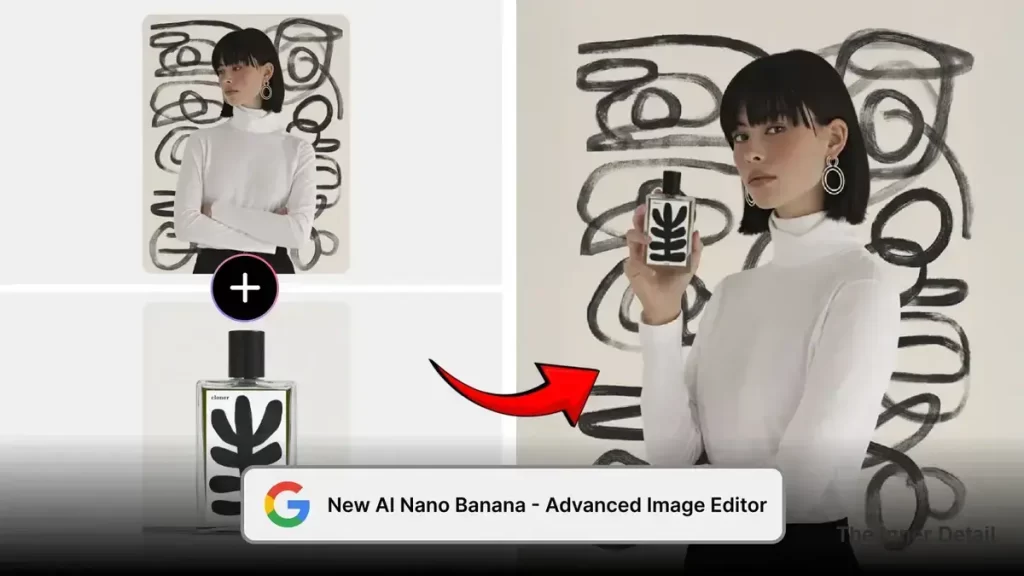
Blend Photos Together: This capability allows you to merge elements from multiple images seamlessly. You can now combine your photo with that of your dog to create a unified portrait of both of you on, say, a basketball court, crafting brand-new scenes that feel entirely natural.
Multi-Turn Editing: Creativity is often an iterative process. With multi-turn editing, you can continuously refine the images Gemini creates. Start with an empty room, paint the walls a new color, then add furniture, a bookshelf, or a coffee table. Gemini works alongside you, altering specific parts of an image while meticulously preserving the rest.
Mix Up Designs: Unleash your inner designer by applying the style or texture from one image to an object in another. Take the vibrant colors and delicate texture of flower petals and apply them to a pair of rainboots, or design a dress using the intricate pattern from a butterfly’s wings. The possibilities for creative expression are truly boundless.
10 Use-Cases of Nano Banana AI
Here are 10 use cases for Google’s new AI editing model:
- Consistent Character Creation: A comic book artist can generate a character and then place them in different scenes, outfits, and poses while maintaining a consistent visual identity.
- Virtual Try-On: A fashion retailer can use the AI to show a customer how a new dress or accessory would look on their own uploaded photo, creating a hyper-personalized shopping experience.
- Real Estate Visualization: A real estate agent can take a photo of an empty room and use the AI to virtually stage it with different furniture, lighting, and decor styles, helping potential buyers visualize the space.
- Product Photography and E-commerce: An e-commerce business can create a single product shot and then use the AI to generate mockups of that product in different settings, against various backgrounds, or in a range of colors and styles, without needing multiple photo shoots.
- Professional Headshots: An individual can upload a selfie and have the AI transform it into a professional headshot with a formal background, attire, and lighting, all with a simple text prompt.
- Social Media Content Creation: A social media influencer can create a series of visually cohesive posts, such as placing themselves in different locations or time periods while keeping their look consistent.
- Personalized Greeting Cards: A user can upload a family photo and use the AI to place everyone in a new, themed scene, like a winter wonderland or a futuristic cityscape, to create unique holiday cards.
- Interior Design Mockups: A homeowner can use the AI to apply a new paint color, swap out furniture, or add new design elements to a photo of their room to see how it looks before making a purchase.
- Historical Photo Restoration and Colorization: A user can upload an old, black-and-white photo and use the AI to not only colorize it but also to repair damage, remove blemishes, and enhance clarity.
- Targeted Image Transformation: A user can make a specific, granular edit to an image with a simple text prompt, such as removing a stray object from the background, changing a person’s hairstyle, or blurring a sensitive detail.
Differentiating from Earlier Gemini Editing
It’s important to note that the Gemini app already offered native image editing features. However, this latest update represents a significant evolution. The previous iterations, while useful, might not have consistently maintained the subject’s exact likeness through extensive transformations, potentially leading to that “close but not quite the same” result.
The new Google DeepMind model specifically addresses this challenge, prioritizing character consistency. This means users now have vastly improved control and confidence when making significant changes to images containing people or pets. It’s about empowering deeper, more complex edits without sacrificing realism, taking the existing functionality to a professional-grade level accessible to everyone.
How Users Can Access It
Accessing these advanced editing features is straightforward. The new image editing model is seamlessly integrated into the Gemini app and is now available for users to explore. Simply provide Gemini with an image you wish to edit, and then articulate your desired changes using natural language commands. Whether you want to add a unique touch, combine elements, or apply a new style, Gemini is ready to bring your vision to life. Once your edits are complete, you can even upload the transformed image back into Gemini to turn it into a fun video.
Transparency and Responsibility
Google also emphasizes its commitment to responsible AI. All images created or edited within the Gemini app will include a visible watermark, alongside an invisible SynthID digital watermark. This ensures clear identification of AI-generated content, promoting transparency and helping users distinguish between authentic and AI-modified visuals.
This significant update within the Gemini app, powered by Google DeepMind’s groundbreaking AI, is set to democratize advanced photo editing, making sophisticated creative tools accessible to a broader audience. Whether you’re a casual user looking to perfect a family photo or a creative enthusiast experimenting with new designs, Gemini’s enhanced capabilities promise to transform your image editing experience.
Key Takeaways
- Google Gemini app gets a major upgrade with a new image editing model from Google DeepMind.
- The new model maintains consistent likeness of subjects across various edits.
- New features include costume/location change, photo blending, multi-turn editing, and design mixing.
- Images created/edited within the app will include visible and invisible watermarks for transparency.
Join our community by subscribing to our Weekly Newsletter to stay updated on the latest AI updates and technologies, including the tips and how-to guides. (Also, follow us on Instagram (@inner_detail) for more updates in your feed).
(For more such interesting informational, technology and innovation stuffs, keep reading The Inner Detail).