
A new 2-years long experiment by a YouTuber reveals the truths of the impact of Fast charging in Smartphone and it’s battery, tearing down the myths around it.
If you’ve recently purchased a smartphone or a new charger, chances are you’re using fast charging daily. This technology, which gets you back to 100% in a flash, is incredibly convenient, but it has sparked significant debate: Is fast charging silently killing your smartphone battery? There’s a widespread belief that using a slow charger overnight is healthier, or that keeping your battery between 30% and 80% is key to longevity.
To definitively answer these questions, a rigorous, 2-years-long experiment by HTX Studio tracked the degradation of numerous iPhones and Android devices across 500 charge cycles, simulating roughly a year and a half of typical use. The results uncover the truth and might change how you view your charging routine.
Fast vs. Slow Charging Showdown
The experiment divided multiple iPhone 12s into two main groups: one using fast charging and one using slow charging, with both groups cycling from 5% up to 100% capacity (counted as 0.95 of a full cycle). A similar setup was run on Android devices, specifically using the iQOO 7 with 120 watts for the fast-charge group and 18 watts for the slow-charge group.
After 167 days and 500 full charge cycles, the capacity loss between the fast-charge and slow-charge groups was surprisingly minimal:
| Device Group | Charging Method (5% to 100%) | Total Battery Capacity Loss (500 cycles) |
|---|---|---|
| iPhone | Slow-charge | 11.8% |
| iPhone | Fast-charge | 12.3% |
| Android | Slow-charge (18W) | 8.8% |
| Android | Fast-charge (120W) | 8.5% |
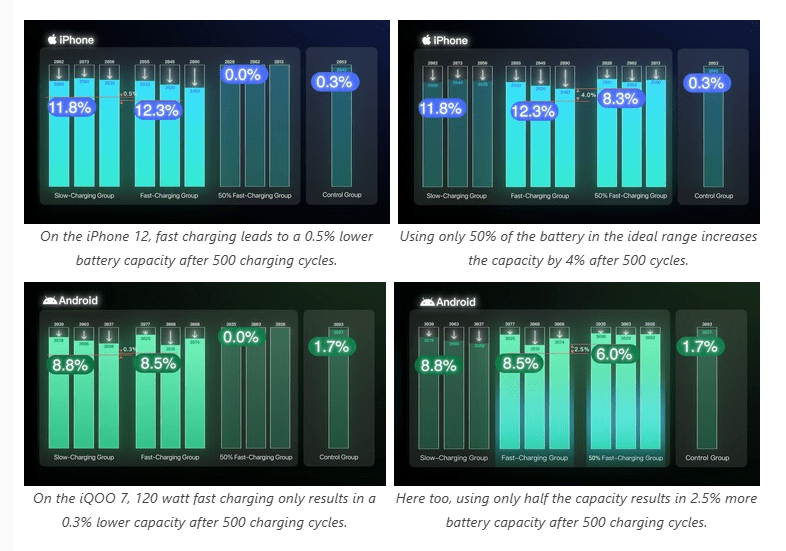
Crucially, the difference in capacity loss was nearly unnoticeable. The iPhone fast-charge group lost just 0.5% more than the slow-charge group. Even more telling, the Android fast-charge group actually dropped 0.3% less capacity than the Android slow-charge group. Based on these long-term results, the fear that fast charging significantly damages your battery compared to slow charging is largely unfounded.
Unmasking the Myths: 30%-80% and the 100% Rule
The research also tackled two of the most persistent battery myths: maintaining the 30% to 80% charge window and the danger of leaving your phone plugged in at 100%.
The 30%-80% Range Myth
The idea that keeping your phone between 30% and 80% is the “healthiest range” for the battery was tested by running a group of phones that only drained from 80% down to 30%, then fast-charged back up to 80% (counted as half a cycle).
The experiment found that this restricted charging range does help reduce battery wear, but the improvement is limited. After 500 cycles:
- The iPhone 50% fast-charge group lost 4% less capacity than the full fast-charge group.
- The Android 50% fast-charge group lost 2.5% less capacity.
Read this: Ways to Save your Smartphone Battery’s Life!
While there is a slight benefit to this method, the question remains whether the constant effort to monitor the charge level is worth the limited improvement.
The 100% Plugged-In Myth
Many people believe that leaving a phone plugged in once it hits 100% is bad for the battery. This idea is based on real-world advice, as Apple even notes that if you store a battery fully charged for an extended period of time, it may lose some capacity.
However, the research conducted a short-term test using six iPhone 12s split into groups left at 1%, 50%, and 100% (while plugged in), powered off, and left for a week. The result? Their battery capacities didn’t change at all. This indicates that battery aging is a long-term process, suggesting that occasionally leaving your phone plugged in overnight isn’t the battery disaster many imagine.
When Should You Actually Replace Your Battery?
While your charging method might not dramatically accelerate wear, all batteries degrade over time. The testing revealed when battery health starts impacting your daily experience:
- Shorter Battery Life: For iPhones, once the battery health drops to around 85%, users start noticing shorter battery life. For Android phones tested, performance after replacement increased by 8% to 10%.
- Performance Throttling: While battery wear doesn’t generally affect raw performance, phones with degraded batteries tend to throttle (slow down) earlier. For example, an iPhone at 85% battery health might slow down at 11% power remaining, whereas with a new battery, it won’t throttle until 5%. In essence, a new battery allows you to use your phone slightly longer before the system slows down to conserve power.
- Replacement Advice: The research suggests that when your battery health falls near 80%, it’s time to consider replacing the battery to restore optimal performance and usage time.
So, What is the Nominal Way to Charge?
The most important takeaway from the comprehensive testing is that the best way to charge your smartphone is simply however you like.
You shouldn’t overthink your charging habits or try to trade your mental energy and convenience for a tiny bit of battery life. The data shows that the major differences in wear often cited in popular advice are almost negligible over the course of typical usage.
Key Takeaways
- Fast charging does not significantly damage your smartphone battery compared to slow charging.
- Maintaining a 30%-80% charge range offers a slight improvement in battery wear, but it may not be worth the effort.
- Leaving your phone plugged in at 100% occasionally is not a battery disaster.
- Consider replacing your battery when its health falls near 80% to restore optimal performance.
- The best way to charge your smartphone is however you like. Don’t overthink it!
Join our community by subscribing to our Weekly Newsletter to stay updated on the latest AI updates and technologies, including the tips and how-to guides.
(Also, follow us on Instagram (@inner_detail) for more updates in your feed and our WhatsApp Channel to get daily news straight to your Messaging App).
