
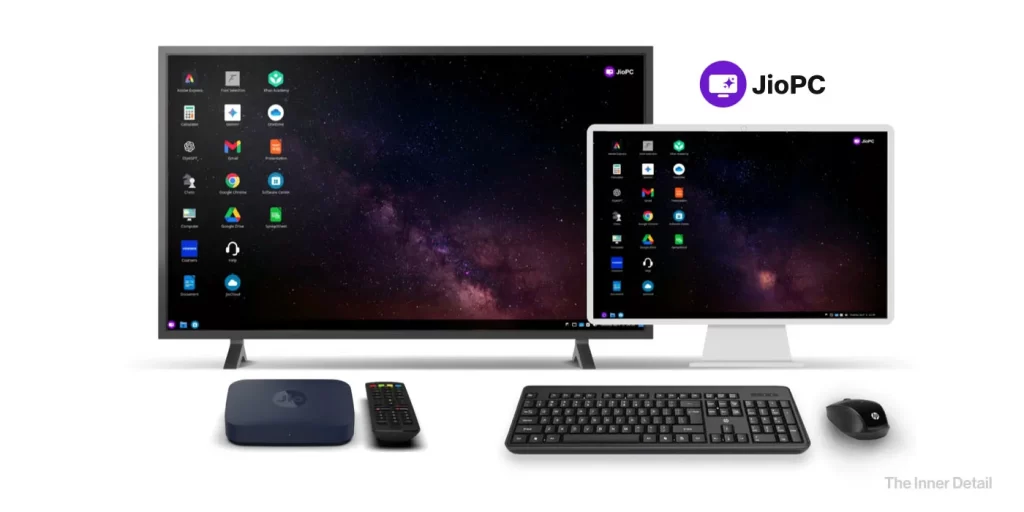
The digital landscape is being reshaped by innovations that make technology more accessible, and JioPC stands out as a prime example. Moving beyond the traditional model of expensive hardware, JioPC offers a cloud-based virtual desktop service that transforms your television into a powerful computer.
This is not just a tool for tech enthusiasts but a solution designed for students, professionals, and families seeking an affordable and flexible way to compute. It’s an AI-ready platform that streams a complete desktop experience, allowing you to work, learn, and create without the burden of maintenance or costly upgrades.
What is JioPC?
JioPC is a virtual desktop service that operates entirely in the cloud. Instead of relying on a physical CPU, all processing power and storage are hosted on Jio’s remote servers. By simply connecting a keyboard and mouse to your Jio Set-Top Box, your TV screen becomes a fully functional computer.
This innovative “computer-as-a-service” platform eliminates the need for a separate desktop or laptop, making computing power readily available to a broader audience. The service runs on a Linux-based Ubuntu operating system, and comes with a default configuration of 8 GB RAM and 100 GB of cloud storage.
How JioPC works?
To get started with JioPC, you need a few essential items. The primary requirement is an active JioFiber or JioAirFiber connection with a compatible Jio Set-Top Box (STB). The service is exclusive to these customers. In addition, you’ll need a keyboard and mouse (either USB or Bluetooth) to interact with the virtual desktop on your TV. Finally, an active JioPC subscription is required to access the service.
Subscription Plans & How to Use It
JioPC operates on a flexible pay-as-you-go model, with a range of plans designed to suit different budgets.
The basic monthly plan costs ₹599 + GST. Longer-term plans offer significant savings, such as the 3-month plan for ₹1,499 + GST which includes an extra month free. Other plans are available for 2, 6, and 12 months with additional bonus months. The JioPC plan is in addition to the Jio Fiber / AirFiber plans. So, a customer has to pay ₹1,200 per month to avail JioPC.
Additionally, JioPC subscribers gain complimentary access to Adobe Express, a design and editing platform, along with a suite of essential AI tools, 100GB of cloud storage and a one-month trial of Jio Workspace with 512GB of cloud storage.
Using JioPC is a straightforward process:
- Turn on your TV connected to the Jio Set-Top Box.
- Navigate to the Apps section and launch the JioPC application.
- Connect a keyboard and mouse to the STB.
- Sign in using your registered Jio mobile number.
- Click on “Launch Now” to begin using your cloud computer.
Final thoughts
With over 70% of Indian households owning a TV but only about 15% owning a PC, JioPC presents a significant opportunity to bridge the digital divide. It offers an affordable and accessible computing solution that bypasses traditional cost barriers associated with personal computing.
While it requires strong consumer education to convince people that a virtual desktop on a TV can replace a traditional PC, experts believe it has the potential to succeed, especially among new users in underserved regions. Its success will hinge on effectively addressing connectivity gaps and digital literacy.
However, the JioPC can’t be comparable to the capabilities and convenience of a regular PC, especially when it comes to accessing various applications.
Key Takeaways
- JioPC is a cloud-based virtual desktop service.
- It transforms your TV into a functional computer using Jio’s remote servers.
- It requires a JioFiber or JioAirFiber connection and a compatible Jio Set-Top Box.
- JioPC Subscription plans offer access to Adobe Express and cloud storage.
- It aims to bridge the digital divide by providing affordable computing.
Join our community by subscribing to our Weekly Newsletter to stay updated on the latest AI updates and technologies, including the tips and how-to guides. (Also, follow us on Instagram (@inner_detail) for more updates in your feed).
(For more such interesting informational, technology and innovation stuffs, keep reading The Inner Detail).
