
Spotify rolls out a new feature in its app – “Messages”, allowing users to send texts, share songs and connect more with your friends and family.
For years, the joy of sharing music, podcasts, and audiobooks has been an integral part of the human experience. Whether it’s the electrifying new track you just discovered, a captivating podcast that sparks your curiosity, or an audiobook that transports you to another world, sharing these moments with friends and family has always been a powerful way to connect.
Recognizing this deep-seated desire for seamless interaction, Spotify is now rolling out a highly anticipated feature: Messages. This new in-app messaging system is designed to transform how you share and discuss your favorite audio content, creating a more integrated and personal discovery journey right within the app.
Sharing means Caring
Imagine a dedicated space where you can easily send that perfect song to a friend, discuss the latest episode of a true-crime podcast, or recommend a gripping audiobook to your book club—all without ever leaving Spotify. That’s precisely what Messages offers. It’s a convenient, one-on-one conversation platform where you can share any Spotify content and enrich your chats with text and emojis. No more bouncing between apps; your musical conversations now have a home.
Why ‘Messages’ Changes Your Spotify Experience
The introduction of Messages isn’t just a minor update; it’s a significant enhancement designed to make your interactions more fluid and rewarding. For users, it means:
- Seamless Conversations: Spark great discussions with those closest to you about the content you both love, right where you’re listening.
- Effortless Discovery: Recommendations from trusted friends and family are incredibly potent. Messages streamline this process, helping you and your network uncover new favorites faster.
- Consolidated Sharing: While you can still share content to other platforms like Instagram or WhatsApp, Messages provides a centralized place for your most intimate and ongoing audio-related discussions.
Beyond the listener, this feature also opens new avenues for artists, authors, and creators. Easier, more direct sharing within Spotify means their work can reach new audiences more organically through genuine word-of-mouth recommendations, helping to cultivate new fans and expand their reach.
Getting Started with Spotify Messages: How-To Guide
Ready to dive into the world of in-app messaging? Here’s everything you need to know about accessing and utilizing Spotify Messages:
- Availability: The Messages feature is gradually rolling out to Free and Premium users who are 16 years or older, in select markets, and is available on mobile devices. Keep an eye on your app for the update!
- Accessing Messages: To view your conversations or start new ones, simply tap on your profile photo located in the top left corner of the Spotify app. This will lead you to your dedicated Messages inbox.
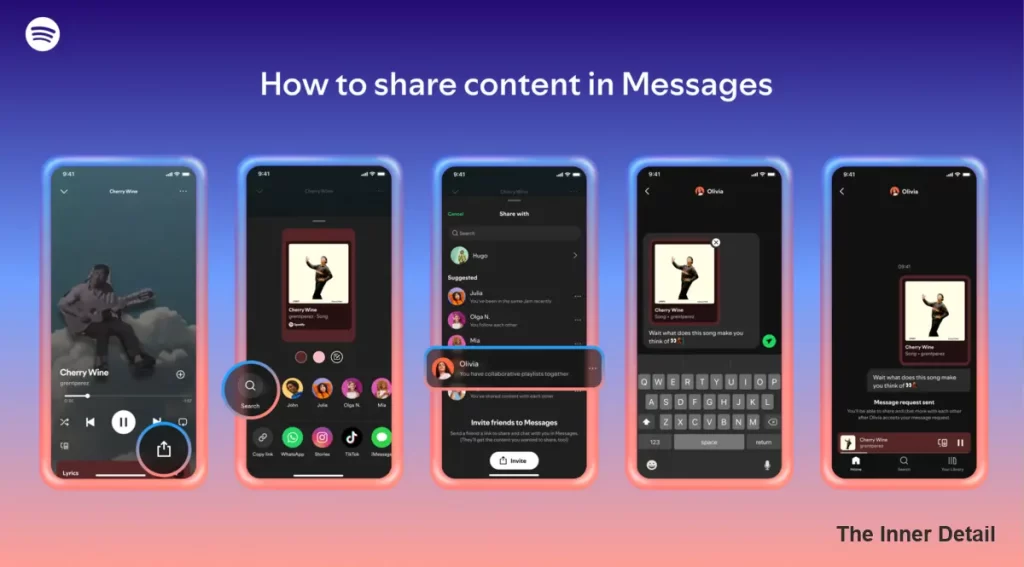
- Sharing Content: When you’re listening to a song, podcast, or audiobook and want to share it with a friend, follow these quick steps:
- Go to the Now Playing View.
- Tap the share icon (usually looks like an arrow or three connected dots).
- Select a friend from your suggested contacts or search for someone you’ve interacted with on Spotify before.
- Hit send!
- Interacting and Replying: Once you’ve accepted a message request, you can fully engage in the conversation. You’ll be able to send texts, react to content with emojis, and seamlessly share more Spotify content back and forth, fostering dynamic discussions.
- Finding Friends to Chat With: Spotify makes it easy to connect. You’ll see suggested people to message based on various interactions, such as:
- Previous content sharing.
- Participation in Jams, Blends, or collaborative playlists together.
- Sharing a Family or Duo Premium plan.
Read this: 10 Useful Google Apps you didn’t know that you might need
Control and Safety at Your Fingertips
Spotify understands that privacy and control are paramount. With Messages, you are always in the driver’s seat of your conversations:
- Accept or Reject: You have the choice to accept or decline message requests from friends and family, ensuring you only engage with people you want to.
- Reporting and Blocking: If something doesn’t feel right, Spotify’s Terms of Use and Platform Rules apply. You can easily report inappropriate content or accounts by holding down on the message, selecting “Report,” and specifying the violation. You also have the option to block other users or opt out of Messages entirely through your Settings.
- Security Measures: Your conversations are protected with industry-standard encryption, both in transit and at rest. This means your data is secured while stored and as it moves between users. Furthermore, Spotify employs proactive detection technology to scan messages for unlawful and harmful content, with human moderators reviewing reported instances, ensuring a safer environment while respecting user privacy.
This is just the beginning for Messages on Spotify. As the feature rolls out and evolves, expect continuous refinements and an even richer, more connected listening experience for users around the globe. Get ready to share, discuss, and discover like never before, all within the harmonious ecosystem of Spotify.
Key Takeaways
- Spotify is introducing in-app messaging for easier content sharing.
- The feature aims to enhance user interaction and discovery.
- Users have control over their privacy and safety within the messaging system.
Join our community by subscribing to our Weekly Newsletter to stay updated on the latest AI updates and technologies, including the tips and how-to guides. (Also, follow us on Instagram (@inner_detail) for more updates in your feed).
(For more such interesting informational, technology and innovation stuffs, keep reading The Inner Detail).