
OpenAI Browser Extension Update
OpenAI has rolled out a major update to its browser extension, allowing the artificial intelligence assistant to interact directly with open browser tabs according to recent reports. This new capability bridges the gap between standalone chat interfaces and active web workflows, letting users pull live webpage data straight into their conversations.
Rather than copying and pasting text manually, users can now tag the browser extension to analyze multiple pages simultaneously. This feature is designed to streamline complex research, product comparisons, and multi-step digital tasks without requiring a dedicated browser.
Practical Computer Use Features
The updated extension introduces several practical computer use features tailored for everyday productivity. Users can request the assistant to synthesize information across multiple open tabs to make informed decisions.
For instance, someone shopping for furniture can ask the system to compare specifications and prices across various retailer pages. Similarly, professionals can gather vendor details from different sites and automatically organize them into a structured comparison layout.
Active Automation in the Chrome Sidebar
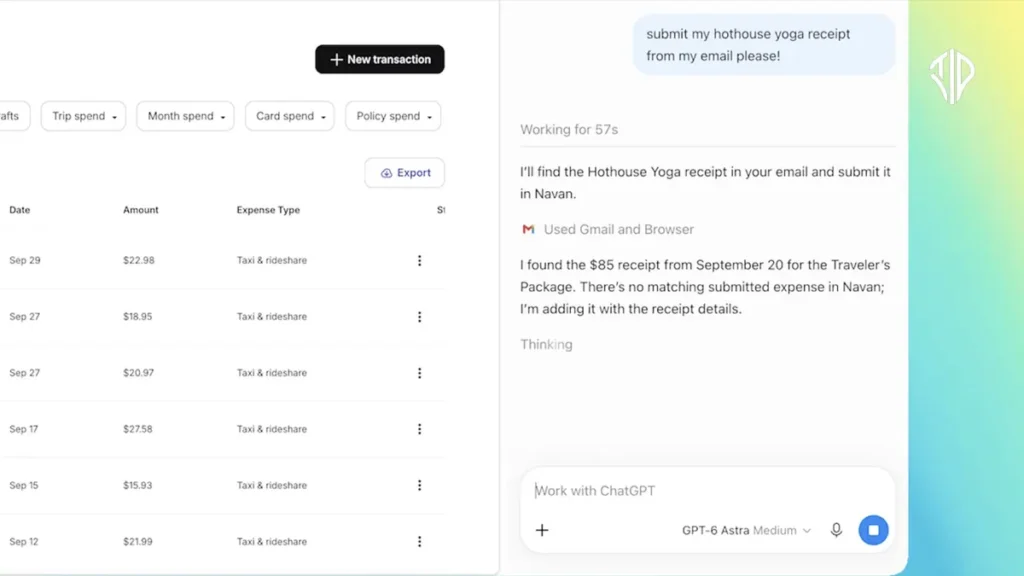
Beyond passive reading, the integration brings active automation elements into the Google Chrome sidebar. The updated sidebar grants access to full conversation histories and workspace tools while users navigate the web.
This allows the assistant to execute tasks such as filling out online registration forms, drafting communications to specific service providers, or organizing cluttered window tabs. These automated actions resemble similar browser-assisting technologies introduced across the wider tech industry, signaling a broader industry shift toward active agentic software.
Security, Privacy, and Future Outlook
Security and privacy considerations naturally accompany any tool capable of viewing active browsing sessions. Users must explicitly invoke or tag the browser context for the assistant to access specific page contents, maintaining a level of user control over sensitive data.
As web-based agents become more sophisticated, these integrations are likely to transform how individuals manage information overload. The ability to delegate repetitive administrative chores directly within a standard browser environment marks another step toward more autonomous digital assistance.
Key Takeaways
- OpenAI’s browser extension update enables direct interaction with open browser tabs.
- Users can analyze multiple pages simultaneously to streamline research and product comparisons.
- The Google Chrome sidebar integration supports active automation tasks like filling forms and organizing tabs.
- Explicit user invocation ensures security and privacy when granting access to active browsing sessions.
Join our community by subscribing to our Weekly Newsletter to stay updated on the latest AI updates and technologies, including the tips and how-to guides.
(Also, follow us on Instagram (@tid_technology) for more updates in your feed and our WhatsApp Channel to get daily news straight to your Messaging App).
