
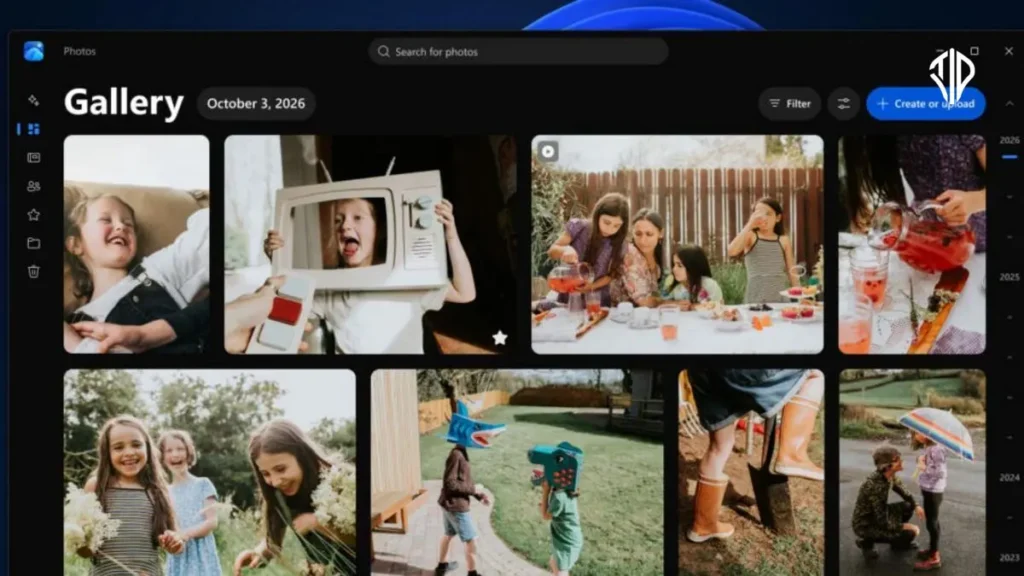
Managing digital memories across multiple devices and cloud platforms has long been a frustrating juggling act for computer users. According to recent updates, Microsoft is addressing this fragmentation by rolling out a major overhaul to its native Photos app on Windows 11.
The redesigned application bridges local storage with major cloud ecosystems. Users can now view and manage images from their personal computer, Microsoft OneDrive, and Apple iCloud within a single unified gallery interface.
This integration eliminates the need to switch between separate desktop applications, browser tabs, or mobile syncing utilities just to find a specific picture. The update aims to streamline media management for cross-platform users who capture photos on smartphones but prefer organizing and editing them on a desktop computer.
Bridging Windows and Apple Ecosystems
Bringing Apple iCloud photos into a Windows native gallery requires a few setup steps to establish secure communication between platforms. Users must first ensure that camera backup is enabled within the OneDrive mobile application on their iOS or Android device.
For Apple users, integrating iCloud requires installing and configuring the official iCloud for Windows utility. Once these background connections are established, the Windows 11 Photos app compiles the disparate sources into a chronological timeline.
Beyond simple date-based browsing, the unified gallery supports shared albums and automated search capabilities. Users can locate specific images using descriptive keywords or facial recognition features that identify people featured in the pictures.
Performance and Offline Access
A common concern with cloud-integrated photo galleries is the reliance on a stable internet connection to view media files. Microsoft has addressed this by ensuring that synchronized files remain accessible even when the device is completely offline.
Performance optimization was a primary focus during the redesign process, resulting in significantly faster app launch times and smoother scrolling through large media libraries. Background processes have been re-engineered to handle thumbnail generation more efficiently without draining system resources.
The media viewer itself has also received a speed upgrade, opening standard image formats noticeably faster than previous iterations. Furthermore, native support has been expanded to include modern graphic formats such as SVG files.
Rebuilt Image Editor and Format Preservation
The internal photo editing suite has been completely rebuilt from the ground up to improve responsiveness and creative flexibility. Microsoft reports that the updated editor launches twenty-five percent faster and organizes editing functions into four distinct categories: Crop, Enhance, Repair, and Stylize.
Professional photographers and casual users alike will benefit from improved handling of high-dynamic-range content. The updated app preserves original HDR quality throughout the editing and saving workflow rather than compressing dynamic range.
Compatibility updates also extend to efficient image formats like HEIC and WebP. Users can now edit and save these modern file types directly without being forced to convert them into legacy formats like JPEG or PNG.
Deployment Timeline
The overhauled Photos experience is currently rolling out to early testers enrolled in the Windows Insider program on Windows 11. Microsoft plans to monitor feedback, resolve performance bugs, and refine the interface over the coming weeks.
A public rollout reaching all standard Windows 11 users is scheduled to take place later this year via a routine application update through the Microsoft Store. This update marks a significant step forward in making Windows a more seamless hub for multi-device digital media consumption.
Key Takeaways
- Microsoft is overhauling the Windows 11 Photos app to integrate local storage, OneDrive, and iCloud into a single unified gallery.
- Performance optimizations deliver faster app launches, smoother scrolling, and offline access to synchronized cloud media.
- A completely rebuilt photo editor organizes tools into Crop, Enhance, Repair, and Stylize while preserving original HDR quality and supporting modern HEIC and WebP formats.
- The update is currently in the Windows Insider program with a public release planned for later this year via the Microsoft Store.
Join our community by subscribing to our Weekly Newsletter to stay updated on the latest AI updates and technologies, including the tips and how-to guides.
Also, follow us on Instagram (@tid_technology) for more updates in your feed and our WhatsApp Channel to get daily news straight to your Messaging App.
