
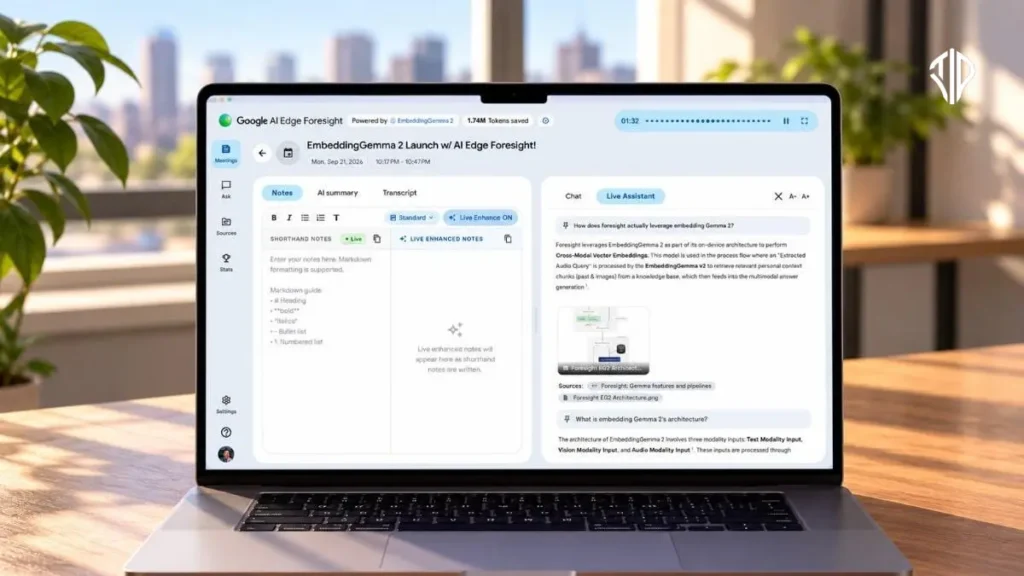
Google has launched Google AI Edge Foresight, a new MacOS application that processes meeting notes and builds personal knowledge bases entirely offline using an on-device AI model. This tool marks a significant shift in productivity software by prioritizing local hardware capabilities, user privacy, and uninterrupted connectivity for modern professionals.
Think of how traditional digital assistants operate. For years, every spoken word in a virtual meeting, every scribbled note, and every uploaded document had to journey across the internet to a massive cloud server.
There, remote data centers analyzed your inputs before sending back summaries or answers. While powerful, this cloud-dependent model introduced latency, required constant internet access, and raised legitimate questions about data privacy and corporate surveillance.
Now, shift your perspective to how we process information locally on our personal devices. Modern computers, especially those powered by advanced Apple silicon chips, possess immense computational power that often sits idle.
Google AI Edge Foresight bridges this gap by bringing artificial intelligence directly to your machine. By processing conversations and documents right where you sit, the software redefines what local productivity tools can achieve without ever touching a remote server.
Key Takeaways
- Full Privacy: All data processing happens locally on your device, ensuring sensitive information never leaves your hardware.
- Offline Operation: The application functions perfectly without an internet connection, making it ideal for remote work and travel.
- High Efficiency: Utilizes the lightweight Gemma 2 model optimized for Apple silicon to prevent battery drain or system lag.
- Knowledge Integration: Acts as a searchable repository by connecting your documents, notes, and meeting transcripts into a single context-aware system.
Understanding Google AI Edge Foresight
Google AI Edge Foresight is a specialized MacOS application engineered to capture, transcribe, and analyze meeting notes seamlessly. Designed specifically to run without an active internet connection, the app leverages the lightweight yet remarkably capable Gemma 2 model with 740 million parameters. This compact artificial intelligence model is optimized to run efficiently on Apple silicon, ensuring that your device handles heavy analytical workloads without draining your battery or lagging.
The application features a familiar split-screen workspace interface, mirroring popular productivity tools like Granola. On one side of the screen, users can type manual shorthand notes or let the application automatically transcribe spoken dialogue. On the other side, an intelligent assistant processes the incoming information in real time, allowing users to ask questions, clarify points, and generate comprehensive meeting summaries instantly.
The Power of On-Device Intelligence
Privacy and speed form the bedrock of this new application. Because the 740-million-parameter Gemma 2 model operates entirely on your Mac, your confidential business meetings, personal brainstorming sessions, and proprietary strategies never leave your hardware.
The advantages of this local architecture are numerous:
- Absolute Privacy: Zero data transmission to external cloud servers eliminates risks associated with cloud data breaches.
- Complete Offline Functionality: Perfect for remote work, long-haul flights, or areas with unstable internet connectivity.
- Lightning-Fast Responses: Local processing removes network latency, delivering instant answers and transcriptions.
- Optimized Hardware Utilization: Tailored specifically for Apple silicon, ensuring high performance and energy efficiency.
Building a Personal Knowledge Base
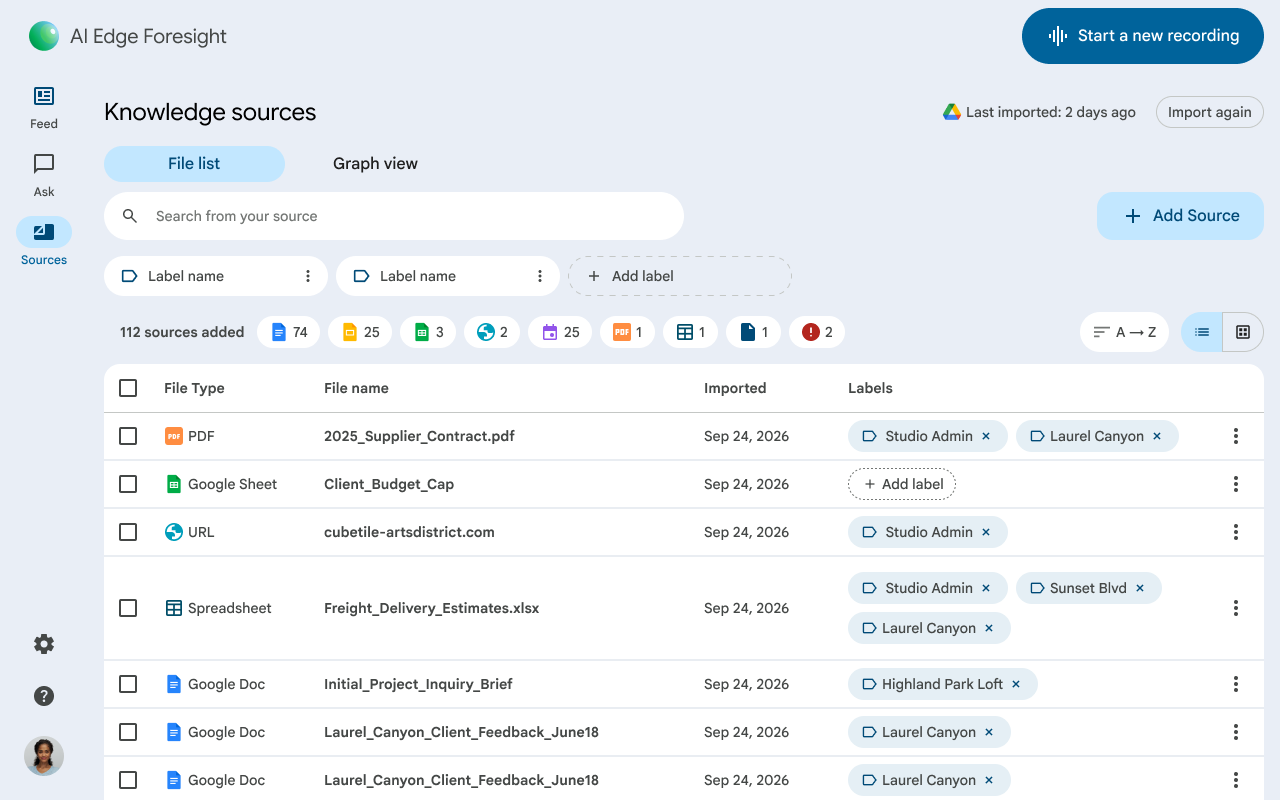
Beyond just taking meeting transcripts, Google AI Edge Foresight allows users to construct a dynamic, searchable repository of information. You can feed the application a wide array of document formats to ground the AI in your specific professional context.
Supported file types and inputs include:
- Portable Document Formats (PDFs)
- Google Docs and Microsoft Office files
- Plain text and Markdown documents
- Web bookmarks and saved articles
By mapping text, audio, images, and video into a shared vector space, the Gemma 2 model connects disparate pieces of information across your files and meeting transcripts. If a question arises during a live discussion that references a document you uploaded weeks ago, the app instantly retrieves that context to provide accurate, real-time answers.
Looking Ahead: The Future of AI Productivity
Google AI Edge Foresight represents a pivotal moment in how we interact with workplace technology. By successfully shrinking powerful language models to run locally on consumer hardware, tech giants are proving that we no longer have to choose between advanced artificial intelligence and absolute data privacy.
As offline capabilities expand to consumer versions and video-calling integrations, our daily workflows are set to become faster, smarter, and entirely secure.
Join our community by subscribing to our Weekly Newsletter to stay updated on the latest AI updates and technologies, including the tips and how-to guides. (Also, follow us on Instagram (@inner_detail) for more updates in your feed).
(For more such interesting informational, technology and innovation stuffs, keep reading The Inner Detail).
