
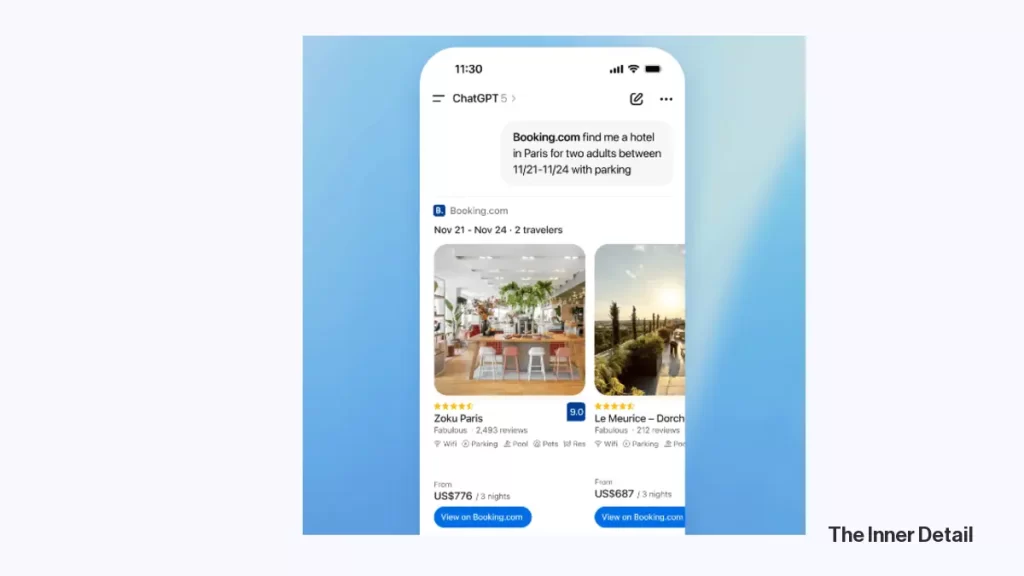
In an age where artificial intelligence is rapidly reshaping how we interact with technology, OpenAI has taken another monumental leap forward. ChatGPT, already a formidable AI assistant, has now unveiled a suite of powerful app integrations, allowing you to seamlessly connect your accounts with popular platforms like Spotify, Figma, Canva, and more. This innovation transforms ChatGPT from a conversational AI into a dynamic command center, poised to supercharge your productivity, creativity, and daily digital workflows. Imagine crafting a presentation, planning a trip, or curating a playlist—all with the effortless guidance of AI.
This new capability marks a significant shift, bridging the gap between advanced AI and the tools you already rely on. It’s about making your digital life more intuitive, efficient, and personalized. Let’s dive into how you can harness the power of these exciting new integrations.
Getting Started: Connecting Your Favorite Apps
Connecting your external applications to ChatGPT is designed to be straightforward, offering you two primary pathways to integration.
The first method is wonderfully intuitive: simply begin your prompt in ChatGPT by typing the name of the app you wish to use. For instance, if you want to create a playlist, you might start with “Spotify, create a personalized playlist…” ChatGPT will then guide you through the necessary steps to sign in and connect your account securely.
Alternatively, if you prefer to set up multiple integrations at once or manage your connected services, you can navigate directly to the Settings menu within ChatGPT. From there, click on Apps and Connectors. Here, you’ll find a curated list of available applications. Select the ones you want to link, and ChatGPT will direct you to the respective sign-in page for each, ensuring a streamlined setup process.
A Crucial Note on Privacy
While the convenience of these integrations is undeniable, it is paramount to understand the privacy implications. When you connect an app, you are sharing specific data from that application with ChatGPT. For example, linking your Spotify account means ChatGPT can access your playlists, listening history, and other personal information. This data sharing is essential for the AI to personalize your experience and execute commands effectively.
Before linking any account, always take a moment to review the permissions you are granting. ChatGPT will clearly outline what information it will access. If you have privacy concerns, weigh whether you are comfortable with the level of access requested. Rest assured, you maintain full control; you can disconnect any app integration at any time directly from the Settings menu.
Unlocking New Capabilities
The current array of integrated apps empowers ChatGPT to assist you across a broad spectrum of tasks. Let’s explore some of the most impactful integrations:
Booking.com
For avid travelers or those planning their next getaway, the Booking.com integration is a game-changer. By linking your account, you can ask ChatGPT to find hotels in your preferred city, specifying dates, budget, number of guests, and even proximity to public transport. You can get more granular, searching for options “with breakfast included,” making the search process far more intuitive than traditional website navigation. Once you find the perfect stay, ChatGPT will direct you to the Booking.com listing to finalize your reservation.
Canva
Graphic designers, content creators, and anyone needing quick visual assets will appreciate the Canva integration. Connect your Canva account, and you can prompt ChatGPT to design everything from “a 16:9 slide deck about our Q4 roadmap” to “a fun poster for a dog-walking business.” You can include specifics like preferred fonts, color schemes, formats (e.g., Instagram posts or stories), and exact dimensions. While AI-generated designs may require minor tweaks to correct occasional distortions or typos, this integration offers an incredible starting point, saving valuable time and sparking creative ideas directly within Canva.
Coursera
Looking to upskill or dive into a new subject? Coursera’s integration helps you discover the ideal online courses tailored to your skill level. You can ask ChatGPT to find an “intermediate-level course on Python,” then compare options by rating, duration, and cost. The chatbot can also provide a quick rundown of each course’s content, ensuring you make an informed decision before enrolling.
Expedia
Similar to Booking.com, the Expedia integration allows ChatGPT to display hotel options and flights without you having to leave the chat interface. Whether it’s a quick weekend escape or a meticulously planned journey, you can specify travel dates, budget, and the number of travelers. Refine your search with commands like “Only show 4-star hotels,” and once you spot a suitable option, proceed to Expedia to complete your booking.
Figma
For designers, developers, and project managers, the Figma integration is invaluable for visualizing ideas. You can ask ChatGPT to generate diagrams, flowcharts, and other visual representations directly in Figma, transforming abstract concepts into tangible assets. It’s particularly useful for illustrating complex workflows or product roadmaps, complete with milestones, deliverables, and deadlines, helping teams stay organized and focused.
Spotify
Music lovers rejoice! The Spotify integration allows for unparalleled personalization. You can ask ChatGPT to create playlists based on your current mood, compile tracks from your favorite artists, or suggest new artists, audiobooks, and podcast episodes tailored to your tastes. Beyond recommendations, ChatGPT can also perform actions like adding or removing items from your Spotify library, all through simple text prompts.
Zillow
The quest for a new home can be daunting, but Zillow’s integration with ChatGPT aims to simplify it. By using text prompts, you can find homes that meet your specific criteria, applying filters for price range, number of bedrooms, and even particular neighborhoods. This makes the search process incredibly efficient and highly customized to your needs.
What’s Next for ChatGPT Integrations?
The current rollout of ChatGPT’s app integrations is just the beginning. OpenAI has announced plans to welcome additional partners in the near future, including major players like DoorDash, OpenTable, Target, Uber, and Walmart, which are expected to launch later in the year. These upcoming integrations promise to further expand ChatGPT’s utility into areas of daily commerce and service.
It’s important to note that these integrations are currently limited to users in the U.S. and Canada, with users in Europe and the U.K. excluded for now. However, the trajectory is clear: ChatGPT is evolving into a central intelligent assistant that works hand-in-hand with your digital ecosystem.
The introduction of these app integrations fundamentally changes how we can leverage AI in our daily lives. By transforming natural language into direct actions across various platforms, ChatGPT is not just answering questions—it’s actively doing tasks for you. This integration fosters a future where your digital tools are more connected, intelligent, and responsive to your unique needs, promising an era of unprecedented efficiency and creative freedom. Explore these new capabilities, experiment with your favorite apps, and unlock a new dimension of AI-powered productivity.
Key Takeaways
- ChatGPT now integrates with apps like Spotify, Canva, and Booking.com.
- Connect apps by typing the app name in your prompt or via the Settings menu.
- Review privacy permissions before connecting apps.
- More integrations with DoorDash, OpenTable, etc., are coming soon.
- Currently available in the U.S. and Canada.
Join our community by subscribing to our Weekly Newsletter to stay updated on the latest AI updates and technologies, including the tips and how-to guides.
(Also, follow us on Instagram (@inner_detail) for more updates in your feed and our WhatsApp Channel to get daily news straight to your Messaging App).
