

OpenAI is finally releasing its very first piece of hardware. However, it is not the highly anticipated and mysterious AI device the company has been developing with former Apple designer Jony Ive. Instead, OpenAI has launched a highly specialized tool designed specifically for developers using its coding platform, Codex.
Created in a limited-run collaboration with the boutique keyboard maker Work Louder, this new device is called the Codex Micro. Designed to help users seamlessly monitor and manage their AI agents, here is everything you need to know about OpenAI’s first physical product.
Key Takeaways
- The Codex Micro is a compact, customizable hardware controller featuring 13 mechanical switches, a dial, a joystick, and a touch sensor.
- It offers live agent tracking via RGB lighting, allowing users to monitor thread status without checking the app.
- The device integrates deeply with Codex for push-to-talk voice commands, navigation, and workflow management.
- Priced at $230, it is a limited-run collaboration available while supplies last.
A Familiar, Tactile Design
The Codex Micro is a compact, square-shaped block of buttons that brings your AI interactions into the physical world. If the design looks familiar, that is because it closely resembles Work Louder’s existing Creator Micro 2 device. It features an identical layout consisting of 13 mechanical switches alongside a dial, a joystick, and a touch sensor.
To ensure the hardware fits your specific workflow, the device is fully customizable and comes with 32 additional keycaps featuring unique Codex icons. This allows you to physically swap out the keys to perfectly match your customized layout.
The device can be connected to your computer via a wired or Bluetooth connection and operates alongside the ChatGPT app.
Live Agent Tracking with RGB Keys
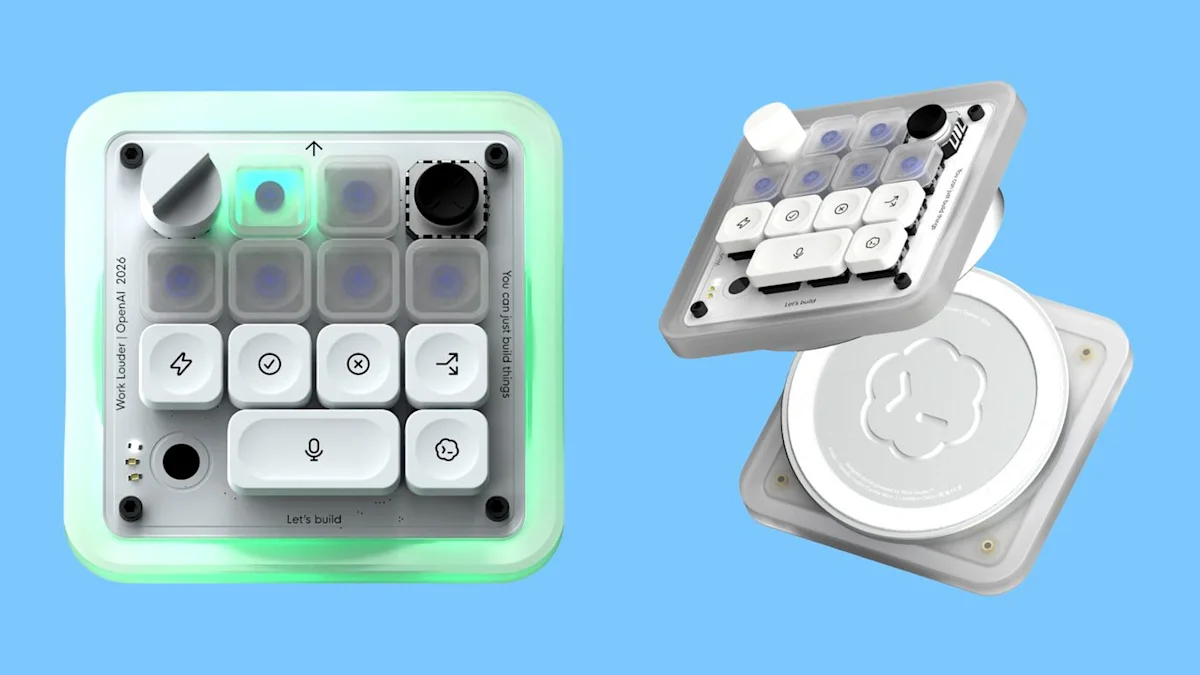
The standout feature of the Codex Micro is its array of six frosted “agent keys” that provide a live view of your active Codex threads. You can configure these keys to represent your pinned threads, your most recent threads, or custom-assigned agents.
These keys utilize live RGB lighting to give you instant visual feedback on what your AI agents are doing in the background:
- White: The agent is idle.
- Blue: The AI is currently thinking or processing.
- Green: The assigned task is complete.
- Amber: The Codex agent has paused and needs your feedback.
- Red: The agent has encountered an error.
- Blinking White: That specific thread is currently selected.
You can interact with these threads without ever opening the app; a single tap on an agent key will select and focus that specific agent in the background, while a double tap will instantly bring the Codex window to the foreground of your screen.
Command Keys and Voice Prompts
Alongside the agent keys are several command keys dedicated to your most common Codex actions. By default, these keys are mapped to essential developer tasks like accepting or rejecting code changes, branching a thread, and activating push-to-talk.
The push-to-talk integration makes conversing with your AI incredibly fluid. You can hold the mic key to start recording your voice and release it to stop, or simply double-tap it for hands-free recording.
While the microphone is live, the device displays a C-green snaking light effect. Once you finish speaking, the RGB lighting switches to a white snaking effect while Codex processes your prompt. Once the light turns solid white, you can press the Codex keycap to send your prompt.
Advanced Navigation: Joystick and Dial
To keep your hands off your mouse, the Codex Micro features a built-in dial and joystick. The dial natively controls the composer bar in Codex, giving you a fast way to move between different options. You simply rotate the dial to change your selection and click it to confirm (or click the red button next to it to cancel).
The four-directional joystick is mapped to specific interface skills. By default, it allows you to quickly toggle plan mode, navigate back and forth through your history, and toggle the sidebar.
Because the entire device is fully customizable via its configuration page, power users can use the input software to unlock up to five additional layers, allowing you to map incredibly complex shortcuts and actions to the hardware.
Pricing and Availability
If you want to add this physical AI companion to your desk, you will have to act quickly. OpenAI stated that the Codex Micro costs $230 and is available for purchase on Supply Co. However, because this is a limited-run collaboration, it is only available while supplies last, and OpenAI has not specified exactly how many units were produced for this partnership.
Join our community by subscribing to our Weekly Newsletter to stay updated on the latest AI updates and technologies, including the tips and how-to guides.
(Also, follow us on Instagram (@tid_technology) for more updates in your feed and our WhatsApp Channel to get daily news straight to your Messaging App).
