
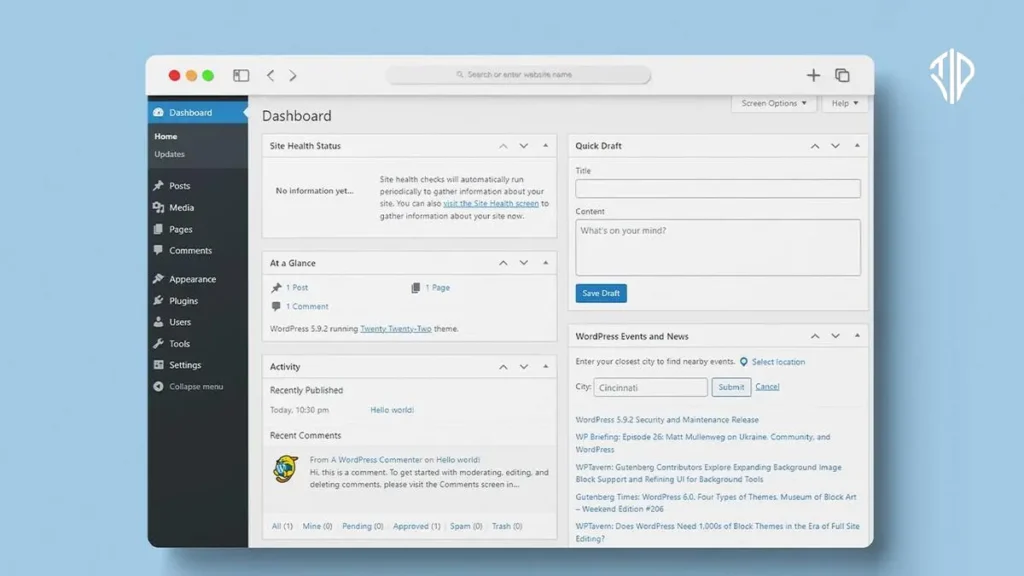
WordPress has officially launched an in-browser website creator that allows users to build fully functional, private sites without a hosting plan, domain, or even an account. This guide explores how the new tool leverages the power of your browser to provide a secure and instant workspace for creators, researchers, and developers.
Key Takeaways
- WordPress Playground creates instant, private instances that run entirely within your web browser.
- No hosting plans, domains, or user accounts are required to start building or drafting.
- Data security is prioritized through local-first storage, ensuring information is never uploaded to external servers.
- Integrated tools like an AI assistant and CRM make it a functional workspace for various professional needs.
- It serves as a risk-free environment for testing new plugins and themes before deploying them to live sites.
A Digital Sandbox for Local Creation
In the physical world, if you wanted to test a new storefront design, you would traditionally need to lease a space and sign a contract before you could even move a single piece of furniture. Web development has long operated under a similar constraint, requiring you to purchase a server and a domain name before you could begin the actual work of designing or writing.
The introduction of this in-browser creator changes that dynamic by providing a digital sandbox that exists entirely within your local environment. It offers a friction-free space where you can experiment with digital architecture without any upfront costs or technical commitments, making the process of creation as simple as opening a new tab.
The Power of the Browser-Based Workspace
The core of this new offering is a tool known as WordPress Playground, accessible via the URL my.WordPress.net. Unlike traditional websites that live on a remote server in a data center, these private sites are powered by your own computer’s browser. This means that the moment you navigate to the site, a fresh instance of WordPress is generated specifically for you.
Because the site is hosted locally within your browser session, it does not require a WordPress.com account or a third-party hosting provider. This accessibility makes it an ideal starting point for those who want to dive straight into the WordPress ecosystem without navigating the complexities of database setups or FTP transfers.
Privacy and Data Security
One of the most compelling features of this tool is its commitment to privacy. WordPress has stated that the data generated within this workspace is not uploaded to any external servers. Instead, everything remains within your browser’s local storage. This local-first approach ensures that your drafts, research, and personal notes remain entirely under your control.
However, it is important to understand the intended use case for these sites. Since they are private and local, they are not optimized for public discovery or high-traffic presentation. They serve as a personal sanctuary for focused work rather than a platform for public broadcasting.
Key Features and Built-in Tools
Despite being a browser-based tool, the workspace is remarkably robust. It provides a generous starting storage capacity and a suite of integrated plugins that enhance the utility of the private site. Users can explore a variety of functional tools right out of the box.
- AI-Powered Assistant: An integrated artificial intelligence tool to help with content generation and site organization.
- Personal RSS Reader: A way to aggregate and read your favorite feeds in a customized environment.
- Customer Relationship Management (CRM): A basic tool for organizing contacts and professional data.
- Plugin and Theme Experimentation: The ability to test how different layouts and tools interact without risking a live site.
Versatile Use Cases for Every User
Whether you are a seasoned developer or a casual writer, this tool offers significant value. For developers, it provides a perfect environment for beta testing new themes or plugins to see how they perform in a clean WordPress installation. For researchers and writers, it functions as a highly organized, private digital notebook.
Standard WordPress vs. In-Browser Creator
| Platform Type | Key Characteristics |
|---|---|
| Standard WordPress Hosting | Requires a monthly fee, involves a public domain name, and is designed for public traffic and SEO. |
| In-Browser Creator (my.WordPress.net) | Completely free, uses no domain or account, and is designed for private drafting and experimentation. |
This new tool lowers the barrier to entry for web mastery, providing a safe, private, and free environment to learn, build, and innovate. By moving the power of the server into the browser, WordPress is making the digital world more accessible than ever before.
Join our community by subscribing to our Weekly Newsletter to stay updated on the latest AI updates and technologies, including the tips and how-to guides. (Also, follow us on Instagram (@inner_detail) for more updates in your feed).
(For more such interesting informational, technology and innovation stuffs, keep reading The Inner Detail).
