
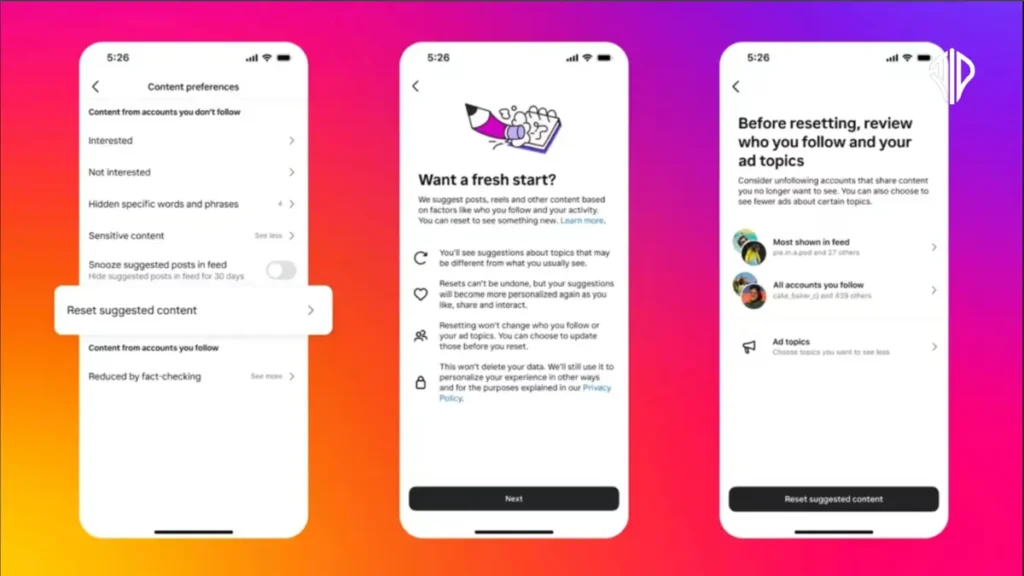
Ever feel like your Instagram feed, especially your Reels, is stuck in a loop of irrelevant content? This guide will show you how to reset your Instagram algorithm, offering a fresh start for your Home, Reels, and Explore pages.
Just as a spring clean brings a refreshing order to your physical space, clearing out digital clutter can revitalize your online experience. Sometimes, our virtual feeds become overwhelmed with content that no longer resonates, making the platform feel less engaging.
Think of it as decluttering your digital life, creating room for new interests and perspectives to flourish. Fortunately, Instagram has introduced a straightforward way to refresh your algorithmic recommendations, giving you back control over what you see.
What Exactly is an Instagram Algorithm Reset?
An Instagram algorithm reset is a powerful feature that allows you to clear the slate on your recommended content across your Explore tab, Reels, and primary Home feed. To truly appreciate this, it’s helpful to understand how Instagram’s algorithm works. Over time, every interaction you have – likes, comments, shares, saves, and even how long you linger on a video – provides signals to Instagram about your preferences. These signals continuously shape the content you’re shown.
While often effective, this system can sometimes lead to a feed filled with content that no longer aligns with your evolving interests, or even worse, topics you find triggering or distressing. Resetting your algorithm isn’t merely about decluttering; it’s about actively taking charge of your Instagram experience and safeguarding your digital well-being. Instagram itself states its aim is to empower users to “shape their Instagram experience, so it can continue to reflect their passions and interests as they evolve.”
Why Would You Want to Reset Your Algorithm?
There are numerous compelling reasons to hit that reset button and give your feed a much-needed refresh:
- Evolving Interests: Your passions change over time. Content about old hobbies might linger long after you’ve moved on to new ones.
- Sensitive Topics: You might be encountering an abundance of content on sensitive issues that causes distress or simply isn’t what you wish to see.
- Repetitive Content: Tired of seeing the same types of posts or creators constantly? A reset can introduce you to a wider variety.
- Accidental Rabbit Holes: We’ve all fallen down a content rabbit hole that doesn’t genuinely reflect our interests. A reset helps you climb out.
- Discovering New Creators: A fresh start can open the door to discovering new creators, perspectives, and communities you might otherwise miss.
Initially rolled out with protections for teen accounts in mind, this valuable feature is now available to all users who feel their feeds have drifted from their authentic selves.
How to Reset Your Instagram Algorithm in 5 Steps
Ready for that refreshed feed experience? Here’s how you can reset your Instagram recommendations:
- From your profile, tap the three-bar ‘More options’ icon in the top right corner.
- Scroll down to ‘What you see’ and tap ‘Content preferences’.
- Tap ‘Reset suggested content’.
- Follow the on-screen instructions and tap ‘Next’.
- Tap ‘Reset suggested content’ to confirm your decision.
Pro tip: Before you finalize the reset, Instagram will offer you the option to review the accounts you are currently following. This is an opportune moment to unfollow accounts that no longer serve your interests or to adjust your ad topics, providing a more granular approach to curating your experience if a full reset feels too drastic.
What Happens After You Reset Your Instagram Algorithm?
Once you initiate the reset, your recommendations will indeed start with a clean slate. However, this doesn’t mean your feeds will be empty. Instagram will initially present a diverse mix of content across your Explore, Reels, and other recommended feeds to give you a starting point.
As you begin to interact with this new content – by liking, sharing, commenting, or even simply watching – Instagram will gradually restart the personalization process. The algorithm will re-learn your preferences based on these fresh signals, tailoring future recommendations to your current interests.
It’s crucial to understand what the reset does not change:
- The accounts you follow (unless you manually unfollow them during the review process).
- The ads you see (these are generally based on broader demographic data and off-platform activity).
- Your existing posts, stories, or direct messages.
Think of it as moving into a beautifully redecorated room: the space is fresh and inviting, but all your cherished belongings and friends remain right where they should be.
Other Ways to Refine Your Instagram Experience
If a complete algorithm reset feels too drastic, Instagram also offers several other tools to help you curate your feeds more intentionally:
- “Interested” or “Not interested”: On any post, tap the three dots in the corner. You can select “Interested” for content you want to see more of, or “Not interested” for content you wish to skip (available on Reels and Explore feeds).
- Hidden Words: Filter out posts containing specific phrases or emojis. Find this option under ‘How others can interact with you’ in your settings.
- Following Feed: Tap the Instagram logo on your home feed to switch to a chronological view of posts from only the accounts you follow.
- Favorites List: Create a curated list of accounts whose content you always want to prioritize. This is found under the ‘What you see’ section in settings.
Ready for a Reset?
Just like rediscovering beloved clothes after a closet purge or making space for a new style, sometimes you don’t realize what you truly need until you’ve taken stock of what you have. An algorithm reset on Instagram offers precisely that opportunity for your digital life.
However, the success of your reset hinges on your intentional engagement afterward. Those initial days post-reset are critical for training the algorithm on your current preferences. Be mindful of what you like, comment on, save, and how long you spend watching various types of content. Your deliberate actions will swiftly shape your newly reset feeds into a space that genuinely reflects your current passions.
Key Takeaways
- An Instagram algorithm reset is a powerful feature to clear your recommended content on Explore, Reels, and Home feeds.
- Reasons for a reset include evolving interests, sensitive topics, repetitive content, accidental rabbit holes, and discovering new creators.
- To reset, navigate to your profile, tap ‘More options’ > ‘What you see’ > ‘Content preferences’ > ‘Reset suggested content’.
- After a reset, Instagram re-learns your preferences based on your new interactions, gradually personalizing your feed again.
- Other tools like “Not interested,” Hidden Words, Following Feed, and Favorites List offer additional ways to refine your Instagram experience without a full reset.
Join our community by subscribing to our Weekly Newsletter to stay updated on the latest AI updates and technologies, including the tips and how-to guides. (Also, follow us on Instagram (@inner_detail) for more updates in your feed). (For more such interesting informational, technology and innovation stuffs, keep reading The Inner Detail).