
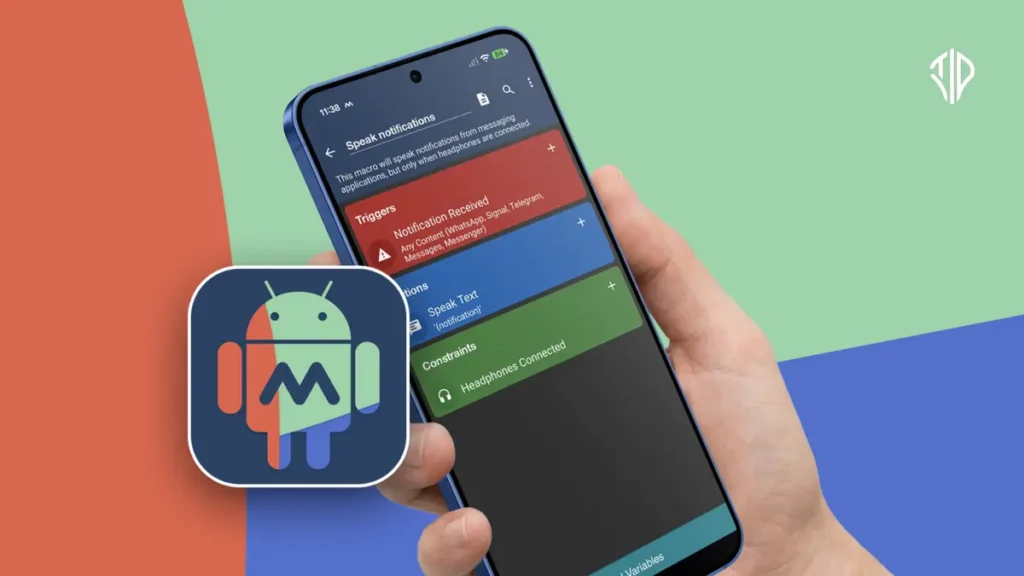
A new app named “MacroDroid” supposedly automates repetitive tasks in your smartphone in a simple and practical way, making things easier.
Smartphones are powerful computers that we carry everywhere, yet we still spend a surprising amount of time performing manual maintenance. We toggle Wi-Fi on and off, adjust ringers for meetings, and launch navigation apps every single time we enter a vehicle. These micro-tasks consume mental energy throughout the day.
Automation applications for mobile devices offer a way to eliminate this friction by handling routine adjustments in the background. By setting up simple conditional logic, users can let their phones manage themselves based on location, time, or connected devices.
The Core Framework of Mobile Automation
The core framework of mobile automation relies on a simple structure consisting of a trigger, an action, and an optional constraint. When a specific event happens, the device executes the designated task without requiring manual input.
Location-based triggers are among the most useful automations for everyday smartphone users. You can configure your device to disable mobile data when connected to home Wi-Fi and re-enable it the moment you step outside.
Another practical automation connects your phone to your car’s Bluetooth or Android Auto system. Upon connection, the device can automatically launch your preferred music streaming application and open maps to help you navigate home or to the office.
Calendar integration provides another layer of convenience for professionals who frequently forget to silence their devices. By linking automation tools to your calendar schedule, your phone can enter silent mode when meetings begin and restore your standard ringtone when they conclude.
MacroDroid Makes Android Automation Simple and Practical
Android users looking to automate repetitive tasks have several options, including Tasker and MacroDroid. While Tasker offers extensive automation capabilities, MacroDroid focuses on making everyday automations easier to create and manage, making it a practical option for users who want to reduce repetitive actions on their phones.
MacroDroid can automate tasks based on a phone’s location, time, connection status or other events. This can be useful for situations such as automatically changing settings when leaving home, restoring mobile data when needed or adjusting the phone for different routines.
The app is built around a simple Trigger → Action → Constraint system. A trigger starts the macro, an action performs the required task, and an optional constraint determines when the automation is allowed to run.
Setting Up Macros Is Relatively Simple
MacroDroid includes a setup wizard that guides users through creating their first automation. Instead of building every macro from scratch, users can also explore macros created and shared by the community and modify them to suit their needs.
This makes the app accessible to users who may not want to spend time learning complicated automation rules.
Location-Based Automation Can Handle Routine Changes
One practical use is creating macros around home and location settings. For example, MacroDroid can automatically manage Wi-Fi and GPS-related settings when a device arrives at or leaves a particular location.
These automations can reduce the need to repeatedly change the same phone settings throughout the day.
MacroDroid Can Automate Driving and Calendar Routines
The app can also be used with Android Auto to create a driving routine. A macro can automatically launch YouTube Music, open Maps and start navigation to a regular destination such as home or work.
Calendar events can also trigger automations. For example, MacroDroid can silence the phone when a scheduled event begins and restore the ringtone after the event ends.
Constraints Provide More Control
Constraints help prevent macros from running at the wrong time. They allow users to specify additional conditions that must be met before an action is performed. This makes automations more precise and reduces the chances of unwanted changes to the phone’s settings.
Free and Premium Versions
MacroDroid’s free version supports up to five macros, which is enough to experiment with basic automation. The premium version removes that limit and adds features such as an ad-free experience and cloud backup.
Users can therefore start with a small number of automations and move to the premium version if they need more extensive functionality.
Automation Can Also Be Used for Fun
MacroDroid is not limited to practical tasks. Users can create simple entertainment-focused macros, such as turning on the flashlight when the phone is shaken. These smaller automations also demonstrate how the app can respond to everyday actions and turn them into customised phone functions.
By connecting triggers with automated actions, MacroDroid can take care of many small tasks that otherwise require repeated taps and manual changes. Its combination of a simple setup process, community-created macros and flexible constraints makes Android automation more approachable for everyday users.
Key Takeaways
- Mobile automation relies on a basic structure of triggers, actions, and constraints to handle routine tasks hands-free.
- Common location and connection triggers include toggling Wi-Fi, launching car navigation, and syncing ringer modes with calendar events.
- Automating basic operations helps conserve device battery life and saves daily mental energy.
- Beginners can start with user-friendly apps like MacroDroid, while advanced users can utilize feature-rich tools like Tasker.
Join our community by subscribing to our Weekly Newsletter to stay updated on the latest AI updates and technologies, including the tips and how-to guides.
Also, follow us on Instagram (@tid_technology) for more updates in your feed and our WhatsApp Channel to get daily news straight to your Messaging App.
